

MINVERSE returns #NUM! on a singular matrix and #VALUE! on one that is not square
Updated
MINVERSE(square_matrix) returns the inverse of a square matrix. The product of a matrix and its inverse is the identity. A singular matrix has determinant 0 and no inverse. Sheets returns #NUM! for that, not a matrix of zeros. A range that is not square is #VALUE! before singularity matters. MDETERM on the same range is 0 when MINVERSE is going to be #NUM!, and it errors on a non-square range too.
Multiplying matrices is MMULT dimensions and MMULT text / blank. A blank inside an otherwise square numeric block is #VALUE! on MINVERSE as well, because the entries have to be numbers. Keep the Google Sheets UI in English. Sheet Error is an independent formula-error library, not a Google product.
Recreate it on a blank sheet
Section titled “Recreate it on a blank sheet”- Open a blank spreadsheet. In A1 type
ok. A21, B22, A33, B34. This is the matrix[[1,2],[3,4]]. Its determinant is1*4 - 2*3, which is-2.
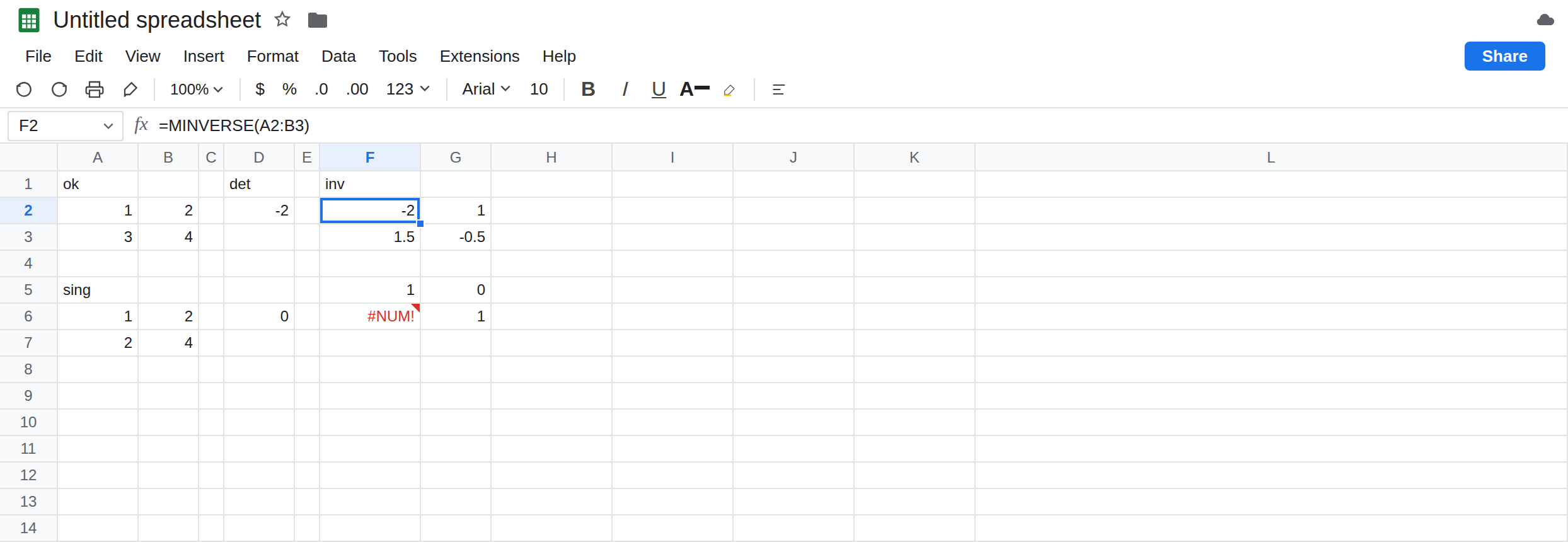
An inverse that exists. In D1 type det. In D2 enter =MDETERM(A2:B3). D2 is -2. In F1 type inv. Leave G2 empty. In F2 enter =MINVERSE(A2:B3). The spill is -2 and 1 on the first row, 1.5 and -0.5 on the second. That is (1/det) * [[4,-2],[-3,1]]. Format if the decimals bother you. The values are exact halves, not a failed fit. Leave F2 as that spill.
Check it with MMULT. In F5 enter =MMULT(A2:B3,F2:G3). The product is the identity: 1 and 0, then 0 and 1. A cell that shows something like 1.11E-16 is floating point, not a wrong inverse. Format those cells as numbers with a few decimals and they read as 0. Leave F5 as the identity.
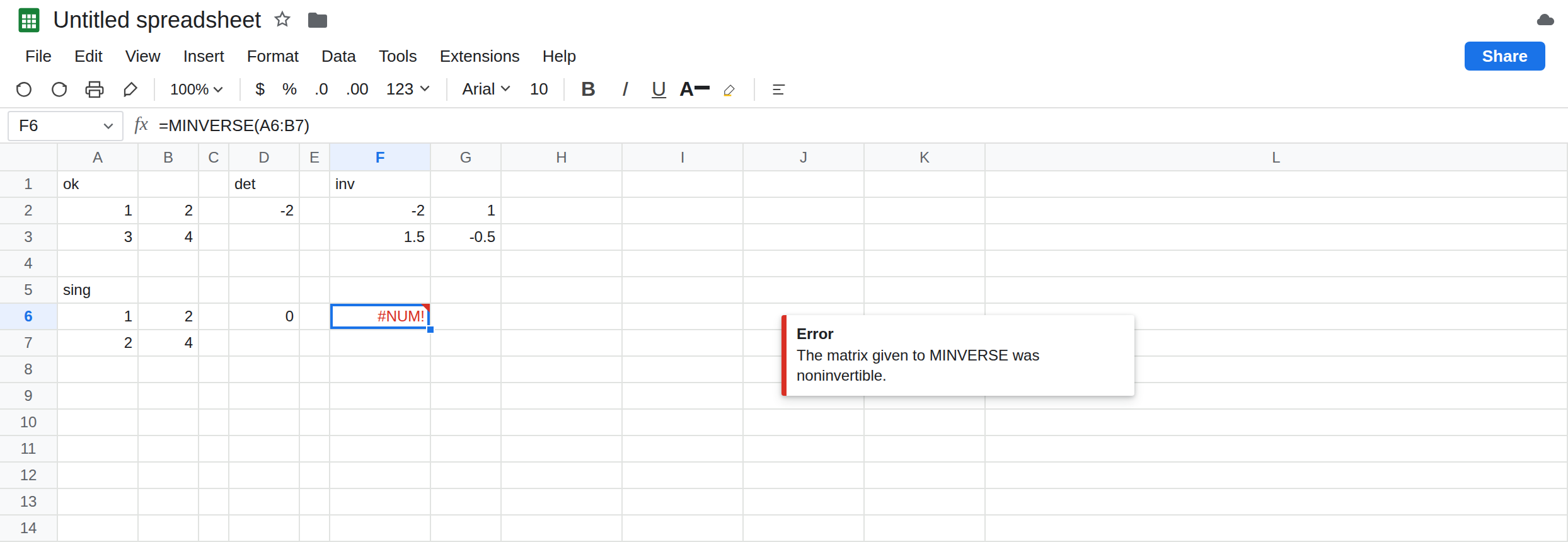
Singular. In A5 type sing. A6 1, B6 2, A7 2, B7 4. The second row is twice the first. In D6 enter =MDETERM(A6:B7). D6 is 0. In F6 enter =MINVERSE(A6:B7). F6 is #NUM!. The tooltip says the matrix given to MINVERSE was noninvertible. Leave F6 broken. Do not read 0 from MDETERM as “the inverse is the zero matrix.” There is no inverse.
Not square. In A9 type wide. A10 1, B10 2, C10 3, A11 4, B11 5, C11 6. Two rows, three columns. In F10 enter =MINVERSE(A10:C11). F10 is #VALUE!. The tooltip is about the range not being square, not about a determinant. MDETERM(A10:C11) is #VALUE! for the same reason. Leave F10 broken so it is not grouped with F6.
A blank inside a square. In B13 leave empty, A13 1, A14 0, B14 1. In F13 enter =MINVERSE(A13:B14). F13 is #VALUE! because B13 is empty, the same coercion rule as MMULT text / blank. This block is square and still not numeric. Leave F13 broken.
A blocked spill. The inverse in F2 needs F2:G3. Type note in G2 and F2 becomes #REF!. The tooltip names G2. Delete note so the numeric inverse stays visible. That #REF! is a neighbor, not singularity.
Leave F6 as #NUM!. Leave F2 as -2. Leave D6 as 0.
What is actually wrong
Section titled “What is actually wrong”- Invertible means square and determinant not zero.
[[1,2],[3,4]]qualifies.[[1,2],[2,4]]is square and singular.#NUM!is the singular case.#VALUE!is “not square” or “not all numbers.” MDETERMis the test that does not pretend to return an inverse. Zero means stop. A very small determinant (powers of ten below what your inputs justify) can still produce an inverse full of noise. IfMMULTof the matrix byMINVERSEis not close to the identity, do not ship the inverse. F5 is the check.- Duplicate rows, or one row equal to a multiple of another, are the usual way a sheet becomes singular. Someone pasted the same readings twice. The function is right to refuse. Changing
MINVERSEtoMMULTwill not invent an inverse. - The result spills to the same shape as the input. A 3×3 inverse needs a 3×3 empty block.
#REF!means that block is not empty. See SORT / UNIQUE spill. MINVERSEis not a reciprocal of each cell.1/A2is notMINVERSE. Element-wise reciprocals on a singular matrix are a different calculation and will#DIV/0!where a cell is 0.
This is not out of domain as SQRT(-1), though the token is #NUM!. The tooltip on F6 names the matrix.
This is not MMULT dimensions. F10 is MINVERSE of a 2×3. MMULT’s inner-dimension rule is a different function.
Leave F6, F10, and F13 broken. Leave F2 and F5 as the working pair.
Use the inverse only when the determinant is not zero. Keep F2. In I6 enter =IF(N(D6)=0,"singular",MINVERSE(A6:B7)). On the singular block, I6 is the word singular instead of #NUM!. Point that pattern at A2:B3 and you get the numeric inverse, because D2 is -2. Do not use IFERROR for this. A #VALUE! from a blank would also become singular and you would “fix” the wrong bug.
Make it square before you invert. F10 needs a square range. Drop the extra column or add the row the model actually has. Do not pad with zeros unless those zeros are real coefficients. A padded row often makes the determinant 0, and you trade #VALUE! for #NUM!.
Fill blanks with numbers if F13 is the matrix you meant. An empty cell is not a zero coefficient until you type 0.
Do not wrap F6 in IFNA. The error is #NUM!. See IFERROR vs IFNA.
If MDETERM is 0, the matrix has no inverse. If MDETERM is #VALUE!, the range is not square or not numeric. If MINVERSE spills and MMULT is not the identity, trust the product over the inverse’s decimals. If the cell is #REF!, clear the block.
Square vs singular vs blank
Section titled “Square vs singular vs blank”[[1,2],[3,4]] has determinant -2 and an inverse that starts at -2. Times the original, it is the identity. [[1,2],[2,4]] has determinant 0 and MINVERSE is #NUM!. A 2×3 is #VALUE!. A blank in a square range is #VALUE!. Zero from MDETERM is the stop sign, not an inverse of zeros.