

GOOGLEFINANCE currency pairs: CURRENCY: syntax, price history, and lag
Updated
A foreign-exchange ticker in GOOGLEFINANCE is the prefix CURRENCY: plus two ISO codes and nothing else: CURRENCY:USDJPY. Three letters (CURRENCY:USD) are #N/A. A slash (USD/JPY) is #N/A, and that slash already has a recreate on GOOGLEFINANCE #N/A. For a stock, a historical window wants close, and price plus dates is #N/A. For a currency pair, the historical attribute is price. Copying the stock rule onto CURRENCY:USDJPY is #N/A in the other direction.
The number you do get is delayed. A figure that disagrees with a bank site is that lag, not a formula error. Sheet Error is not a broker and not Google. Do not trade from this recreate. Do not copy a rate out of this page. There is no rate in this page.
Illegal attributes on a stock symbol, and an end date before the start, are GOOGLEFINANCE attribute. Keep the Google Sheets UI in English.
Recreate it on a blank sheet
Section titled “Recreate it on a blank sheet”- Open a blank spreadsheet. You need a network.
Loading…for a moment is the fetch.
A full pair, real-time. In A1 type pair. In A2 enter =GOOGLEFINANCE("CURRENCY:USDJPY"). When the fetch works, A2 is one number. No slash, no space, six letters after the colon. That cell is the control. If A2 is #N/A with a symbol tooltip, you are offline or the prefix is wrong. Read the tooltip before you add dates.
Not a pair. In A4 type one_code. In A5 enter =GOOGLEFINANCE("CURRENCY:USD"). The cell shows #N/A. USD is not a from-to pair. Leave A5 broken. In A6 enter =GOOGLEFINANCE("CURRENCY:USD JPY"). The space makes this a different symbol. #N/A. Leave A6 broken.
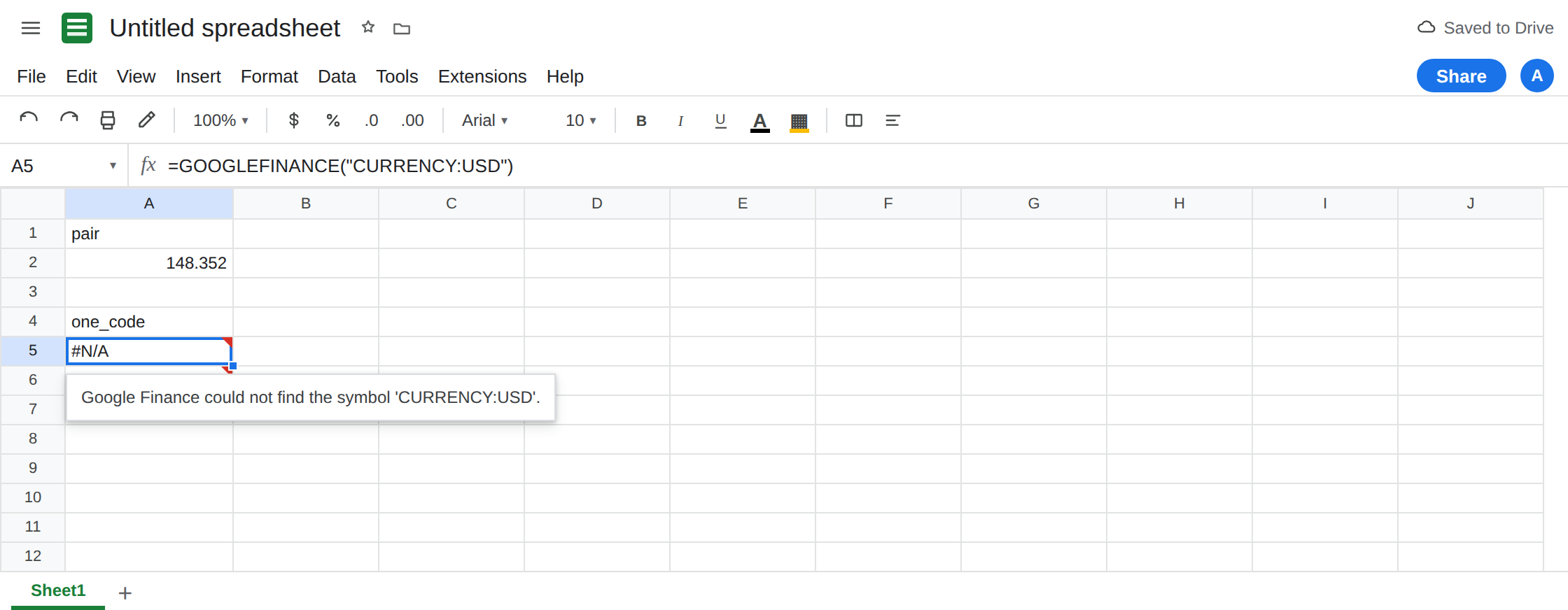
Stock history syntax on a currency pair. In C1 type close_fx. In C2 enter =GOOGLEFINANCE("CURRENCY:USDJPY","close","2024-01-02","2024-01-05"). The cell shows #N/A. close is a stock historical attribute. It is not the currency history name. Leave C2 broken. The same "close" plus dates on GOOG is a different call, documented on the attribute page. Do not “correct” C2 by switching the ticker to a stock and calling it a currency lesson.
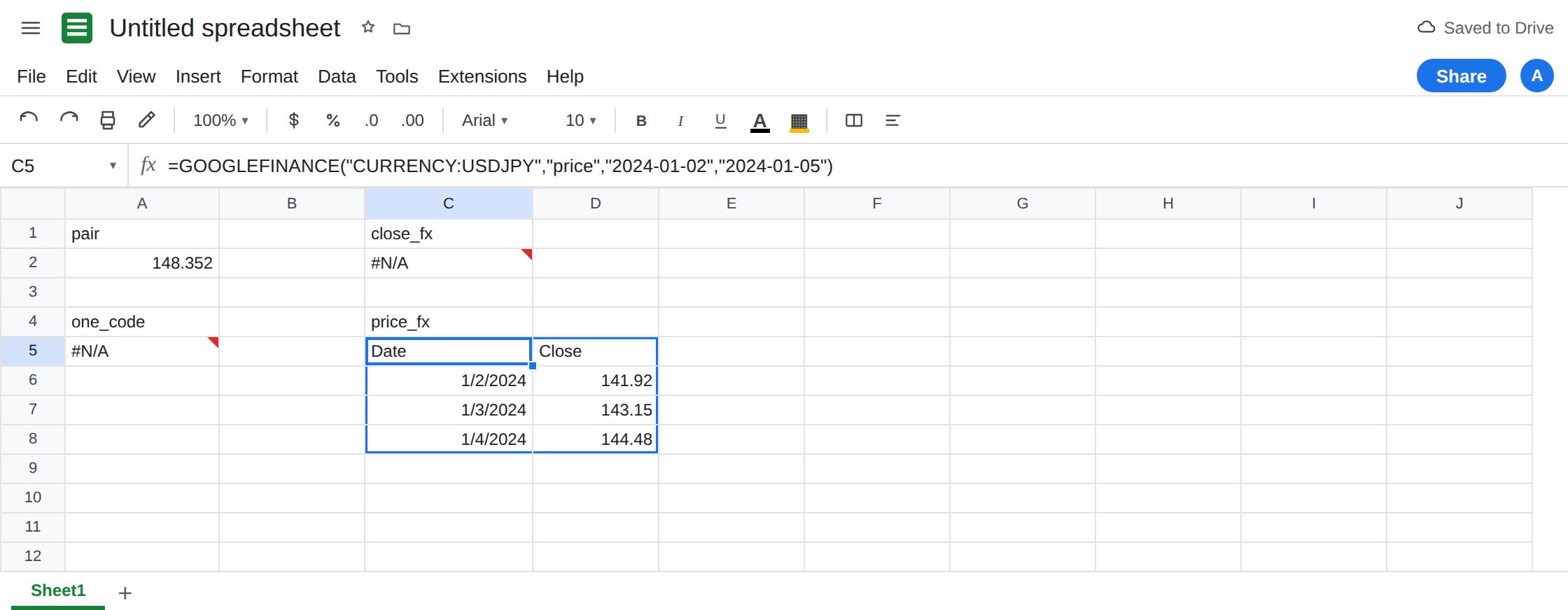
Currency history uses price. In C4 type price_fx. Leave C5:D12 empty. In C5 enter =GOOGLEFINANCE("CURRENCY:USDJPY","price","2024-01-02","2024-01-05"). When the fetch works, C5 spills a small table: a header row and one row per day in the window. That spill is the historical control. "price" with dates is legal here. On a stock it is not. If C5 is #REF! because D6 or the cell below is occupied, the window was fine and the rectangle was not. See SORT / UNIQUE spill. Clear the blocker. Do not change "price" to "close".
Lag is a number. In E1 type delay. In E2 enter =GOOGLEFINANCE("CURRENCY:USDJPY","datadelay"). When it returns, E2 is a number of minutes, not #N/A. A2 can be that many minutes behind a dealing screen and still be a successful formula. Refreshing the browser is not a live feed. Do not add NOW() to force a quote. The delay itself is GOOGLEFINANCE delay. See also the delay note on GOOGLEFINANCE #N/A.
The inverse is a different pair. =GOOGLEFINANCE("CURRENCY:JPYUSD") is not a formatting of A2. Each call is its own delayed quote. Do not divide the two into a rate for a trade.
Leave A5, A6, and C2 broken. Leave A2 as one number if it loaded. Leave C5 as the spilled history if it loaded.
What is actually wrong
Section titled “What is actually wrong”- The ticker is
CURRENCY:and exactly two codes.CURRENCY:USDJPYis dollar to yen.CURRENCY:USDhas a destination missing.USD/JPY,USDJPYwithout the prefix, andCURRENCY:USD-JPYare not repaired by a second argument. The slash form is on the ticker page. This page’s short form is A5. - Attributes are not shared with stocks. Real-time currency uses
price(or omits the attribute, which is the same quote). Historical currency usespriceplus a start and an end.close,volume, andepson a currency pair are#N/A. C2 copies a stock habit onto FX. - A historical call spills. A real-time call does not. If you needed one rate for 2 Jan 2024, take it from the spilled table (or
INDEXthat table). Do not expect C5 to be a single cell the way A2 is. #N/Ameans the symbol, the attribute, or the window failed. A number you dislike is not#N/A.datadelaytells you the quote is late. The attribute page covers an end date before the start. Do not refresh A5 until it becomes a rate. It will not. This is notIMPORTXMLof a rates page. See IMPORTXML quota. A cool-down on import functions does not fixCURRENCY:USD.
Leave A5 and C2 broken.
Six letters, prefix, no separator. Keep A2: =GOOGLEFINANCE("CURRENCY:USDJPY"). Build it from two cells if the codes are inputs: =GOOGLEFINANCE("CURRENCY:"&D2&E2) where D2 is USD and E2 is JPY. Do not insert a slash between them.
History: price, then dates, and an empty rectangle. Keep C5 when it spills. "close" stays on stock tickers. If you only wanted the latest quote, use A2 and do not pass dates.
Do not wrap A5 in IFERROR. A bad pair and a network miss would both become blank. See IFERROR vs IFNA. Do not paste a number over A2 and tell a reader it is the current rate.
If the ticker starts with CURRENCY: and is #N/A, count letters after the colon (six, no space) and, when dates are present, use price. If the cell is a number and a website shows another number, read datadelay. That gap is the lag.