

Fix QUERY LIMIT / OFFSET mistakes in Google Sheets (not empty WHERE)
Updated
QUERY limit caps how many data rows spill. offset skips rows after the sort/filter, before the cap. limit 0 is a legal way to return nothing. offset larger than the table is also nothing. Both present as #N/A with Query completed with an empty output — the same tooltip as a WHERE miss. limit is not a filter: limit A = 101 does not parse as a condition.
This page is LIMIT / OFFSET. It is not QUERY no rows (where A = 999). It is not QUERY parse string. It is not QUERY PIVOT. Keep the Google Sheets UI in English.
Recreate it on a blank sheet
Section titled “Recreate it on a blank sheet”- Open a blank spreadsheet. In A1 type
sku, B1name. A2101. B2Widget. A3102. B3Gadget. A4103. B4Lamp. A5104. B5Gear. Four products.
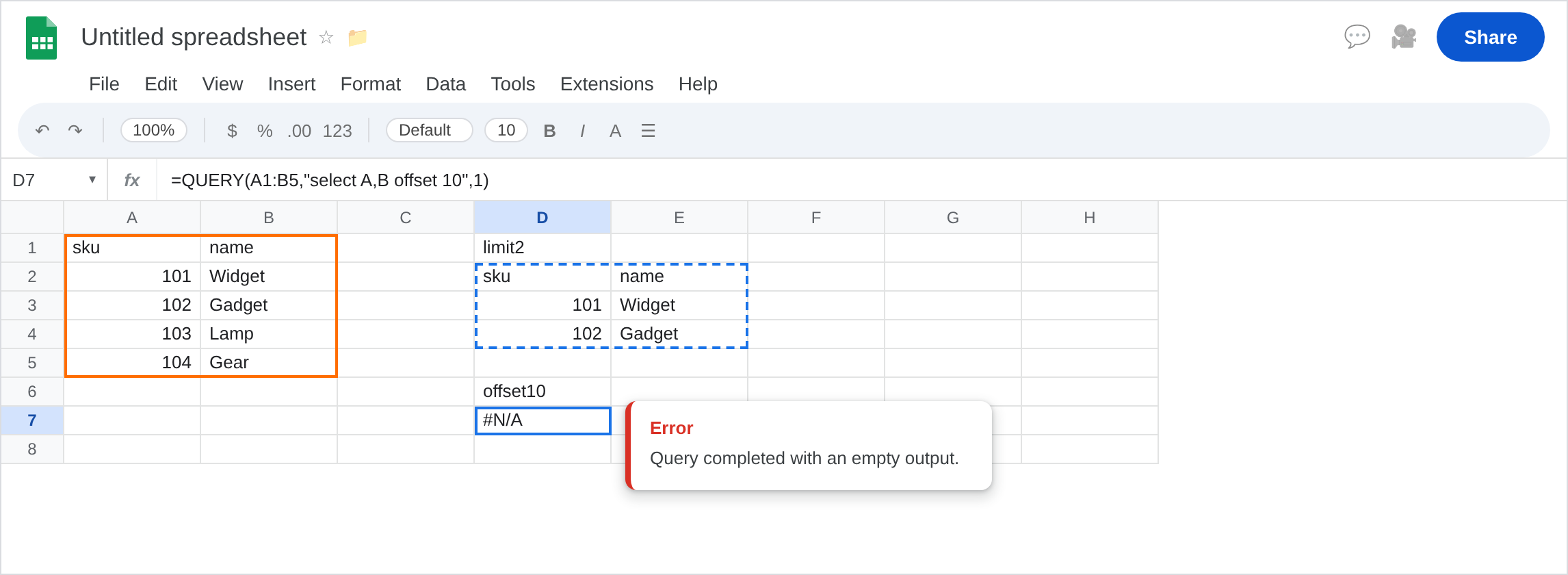
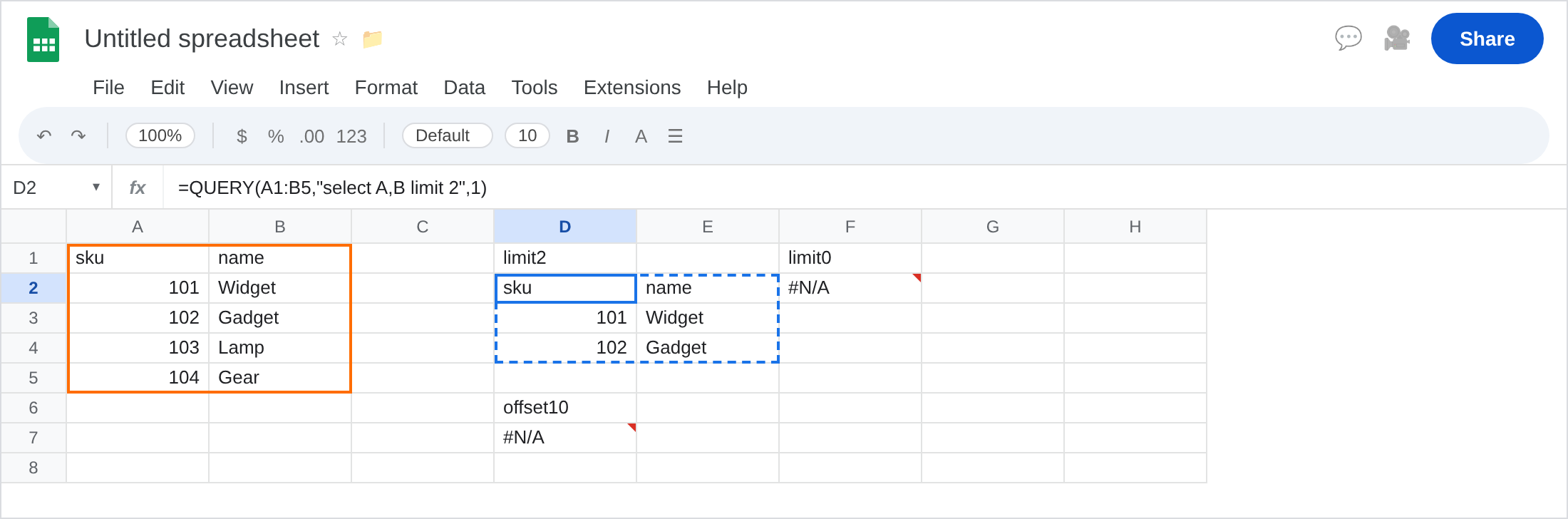
LIMIT that works. In D1 type limit2. In D2 enter =QUERY(A1:B5,"select A,B limit 2",1). The spill is the header plus 101 / Widget and 102 / Gadget. That block is the control: limit is a count, not a sku.
OFFSET past the table. In D6 type offset10. In D7 enter =QUERY(A1:B5,"select A,B offset 10",1). Four data rows. Skip 10. The cell shows #N/A. Tooltip: Query completed with an empty output. Leave D7 broken.
LIMIT 0. In F1 type limit0. In F2 enter =QUERY(A1:B5,"select A,B limit 0",1). #N/A, empty output. You asked for zero rows. Leave F2 broken.
LIMIT used like WHERE (parse). In F5 enter =QUERY(A1:B5,"select A,B limit A = 101",1). #VALUE!, Unable to parse query string. limit wants a number, not a condition. Leave F5 as the parse contrast. That family is QUERY parse string.
WHERE miss contrast. In H2 enter =QUERY(A1:B5,"select B where A = 999",1). Also empty #N/A. The clause is where, not offset. That primer is QUERY no rows. Leave H2 as contrast. All four skus are still on the sheet.
OFFSET then LIMIT. In H6 enter =QUERY(A1:B5,"select A,B offset 1 limit 2",1). Skip Widget, take Gadget and Lamp. Working. Order is offset then limit in the statement (both after select).
Leave D7 and F2 as empty-output from paging. Leave F5 as parse. Leave H2 as WHERE. Leave D2 as the working limit 2.
What is actually wrong
Section titled “What is actually wrong”offset 10on four rows skips everything. Empty output#N/Ais success for that statement, not a brokenQUERYengine.limit 0is the same empty#N/A. It is not “unlimited.” Unlimited is omittinglimit.- Headers (
1as the thirdQUERYargument) do not count as a data row you can offset back. You still get#N/Awhen no data row remains. You do not get a header-only spill you can treat as a table in every case. limit A = 101is a parse error. Filtering iswhere A = 101. Paging islimit N.order byhappens before offset/limit.offset 1withoutorder byskips whichever row is first in the range, not “the smallest sku.”
This is not mixed dates. See QUERY mixed dates.
This is not contains case. See QUERY contains / matches.
This is not FILTER #N/A. See FILTER no match.
Leave D7, F2, F5, and H2 broken.
Page inside the table. Keep D2: limit 2. For the last two skus: =QUERY(A1:B5,"select A,B offset 2",1) (101–102 skipped, 103–104 remain). For “start at row index k” compute offset from COUNTA — do not guess 10 on a four-row demo.
Filter vs page. Sku 101: where A = 101, not limit. Keep F5 broken as the reminder.
When empty paging is allowed, wrap: =IFNA(QUERY(A1:B5,"select A,B offset 10",1),"none"). Only after you know offset is the reason. See IFERROR vs IFNA. Do not IFNA F5 (#VALUE! parse).
If #N/A empty output and where is missing, read limit / offset. If the tooltip is Unable to parse, you put a condition on limit. If where A = 999 is in the string, that is the no-rows primer.
OFFSET past the end vs WHERE miss vs LIMIT 0
Section titled “OFFSET past the end vs WHERE miss vs LIMIT 0”All three can be empty #N/A.
offset 10 → paging past the data (D7). Shrink offset.
limit 0 → you asked for zero (F2). Omit limit or pass a positive count.
where A = 999 → no sku (H2). See QUERY no rows. The next step is the criterion, not the page size. Parse errors never reach paging.