

GOOGLEFINANCE prices are delayed up to 20 minutes, and sometimes #N/A
Updated
GOOGLEFINANCE can return a price that is older than the print on a broker’s screen. Google’s help says quotes are not sourced from all markets and may be delayed up to 20 minutes, and that the price attribute is a real-time quote delayed by up to 20 minutes. The cell is still a number. It is not #N/A. Refreshing the browser does not turn it into a live feed. The attribute datadelay returns how many minutes that quote is delayed, when the symbol supports it.
A #N/A for a bad ticker or a slash in a currency pair is GOOGLEFINANCE #N/A. A bad attribute or a reversed historical window is GOOGLEFINANCE attribute. Currency pairs and datadelay on CURRENCY:USDJPY are currency pair.
Sheet Error is not a broker and not Google. Do not trade from this page. Do not copy a price out of a cell into this article.
Recreate it on a blank sheet
Section titled “Recreate it on a blank sheet”- Open a blank spreadsheet. You need a network. Keep the Google Sheets UI in English. In A1 type
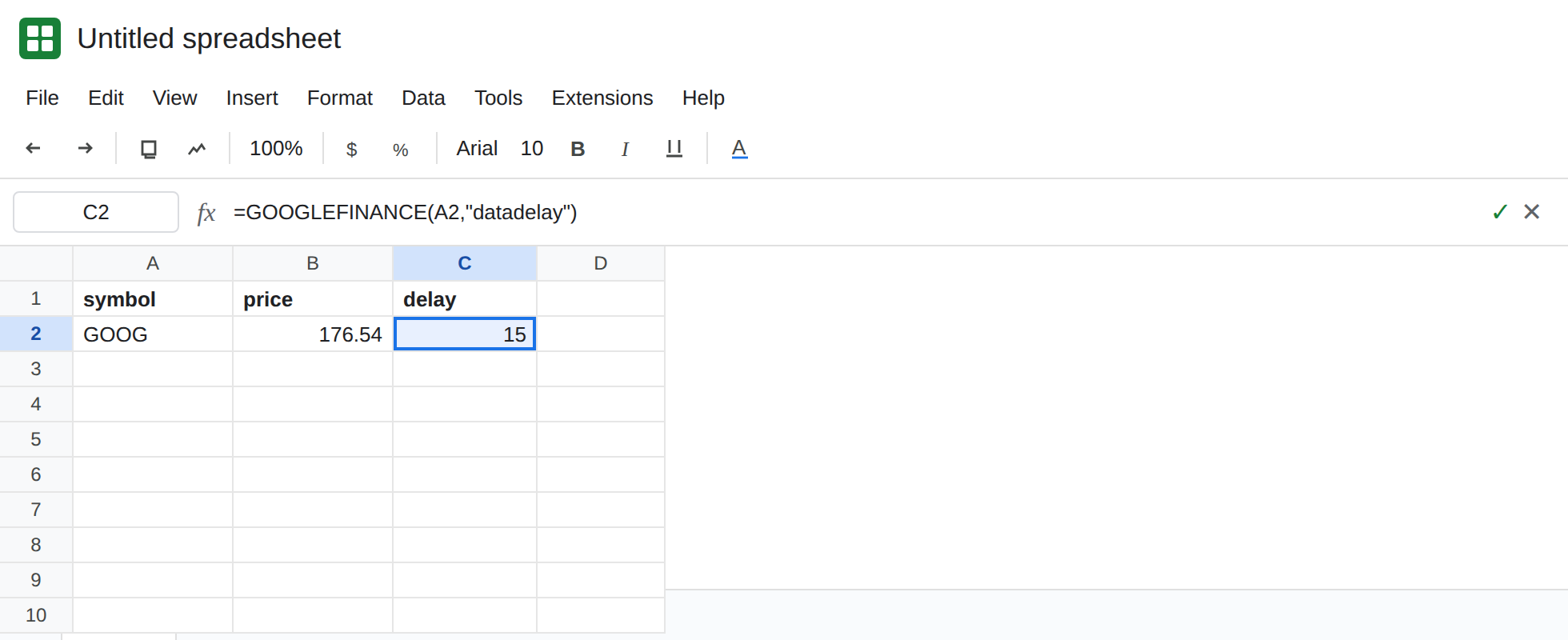
symbol. A2GOOG.
A price, if the fetch works. In B1 type price. In B2 enter =GOOGLEFINANCE(A2,"price"). When the fetch works, B2 is a number. Do not type that number into another cell to freeze a “correct” quote. If B2 is #N/A, the symbol or the network failed. That is GOOGLEFINANCE #N/A. Fix that before you judge a delay. A short Loading… is the fetch, not staleness.
The documented lag. In C1 type delay. In C2 enter =GOOGLEFINANCE(A2,"datadelay"). When it returns, C2 is a number of minutes, not a price and not #N/A. Google’s help defines datadelay as how far the real-time data is delayed. C2 can be 0 when the feed has no lag to report, or a positive number up to the delay Google documents. Leave C2 as that number. B2 can disagree with a broker app by about that many minutes and still be a successful formula.
A historical close is not “right now.” In E1 type close. In E2 enter =GOOGLEFINANCE(A2,"close","2024-01-02","2024-01-05"). When the fetch works, E2 spills a small table of sessions in that window. Those rows are history. They will not match a broker’s last print today. Leave the spill. Do not copy the closes into the article.
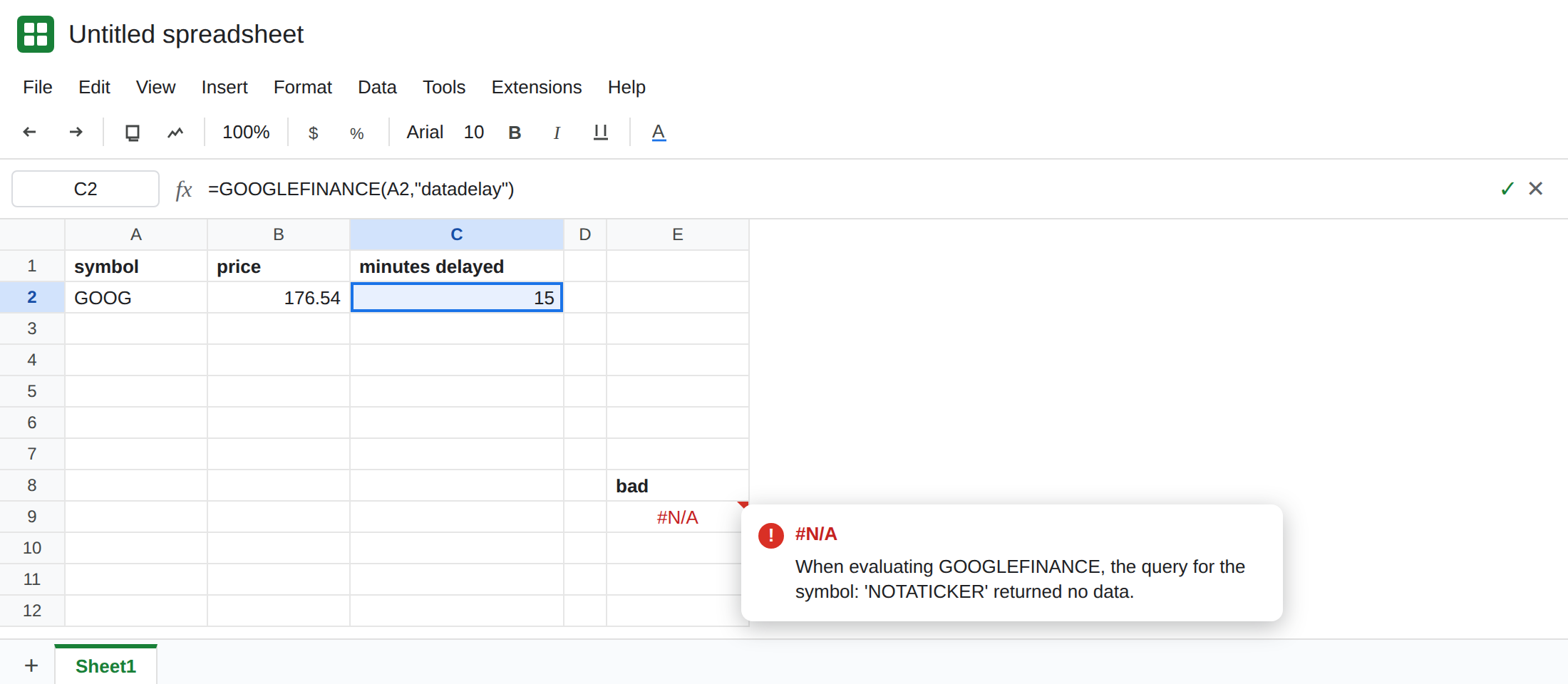
A bad symbol is still #N/A. In E8 type bad. In E9 enter =GOOGLEFINANCE("NOTATICKER","price"). E9 is #N/A. The tooltip says the query for the symbol returned no data. Delay never starts. Leave E9 broken. See GOOGLEFINANCE #N/A.
Forcing a refresh does not remove the delay. Do not append NOW() or RAND() to the ticker to “make it live.” The function fetches on its own schedule. A volatile wrapper adds recalculation. It does not subscribe you to a trading feed. File → Settings → Calculation changes how often Sheets recalculates. It does not change Google’s quote delay.
What is actually wrong
Section titled “What is actually wrong”- The product is delayed by design. Google’s help states up to 20 minutes, and states that the information is not for trading. A 15-minute gap and a 20-minute gap are the same kind of result.
datadelayis the number for this symbol, not a promise that every ticker lags the same amount. - A number you dislike is not an error.
#N/Ameans the call failed (symbol, attribute, window, or no data). B2 and C2 can both be numbers while a phone app shows a newer trade. That is this page. pricewithout dates is the quote attribute.closewith dates is history. Comparing them to each other and calling the sheet broken mixes two requests. See GOOGLEFINANCE attribute.- Not every market is sourced. A symbol that never resolves is
#N/A, not a long delay. Waiting twenty minutes will not createNOTATICKER. IFERRORaround B2 hides a later#N/Aand also hides nothing about the delay, because the delay is a successful number. See IFERROR vs IFNA.
Leave E9 as #N/A. Leave B2 and C2 as formulas.
Read the delay next to the price. Keep C2: =GOOGLEFINANCE(A2,"datadelay"). Label the column minutes delayed. When you compare B2 to a broker, subtract that context. Do not average B2 with the broker print to “correct” the sheet.
Use history when you mean history. E2’s close window is the tool for a past session. It will not track the next print. For a currency pair, keep the CURRENCY: prefix and read datadelay the way currency pair describes.
When the cell must be a value you typed, copy B2 and paste values only if you intend to freeze a snapshot. The snapshot will not update, and it is still not a trading price. Label it with the time you pasted it (=NOW() once, then paste that as a value too). A live NOW() beside a delayed price does not timestamp the trade. See NOW / TODAY timezone.
If B2 is a number and another screen is newer, read datadelay. If B2 is #N/A, you are on the symbol or attribute page. Reloading will not delete a delay Google documents, and it will not invent a ticker.