

QUERY CONTAINS treats the pattern as literal text; MATCHES treats it as a full-cell regex
Updated
contains tests a substring and treats every character as itself. A dot is a dot. A star is a star. matches tests a regular expression against the whole cell. A dot means any character. matches 'a.c' hits abc and a.c. It does not hit abc extra, because the pattern has to cover the entire value. Google’s query language documents that: matches 'an' does not match Canada.
contains 'Pro' also matching Processor, and 'pro' missing Pro, is QUERY contains. This page is metacharacters and the full-cell rule. An empty result is still #N/A with Query completed with an empty output. Keep the Google Sheets UI in English. Locale United States.
Recreate it on a blank sheet
Section titled “Recreate it on a blank sheet”- Open a blank spreadsheet. In A1 type
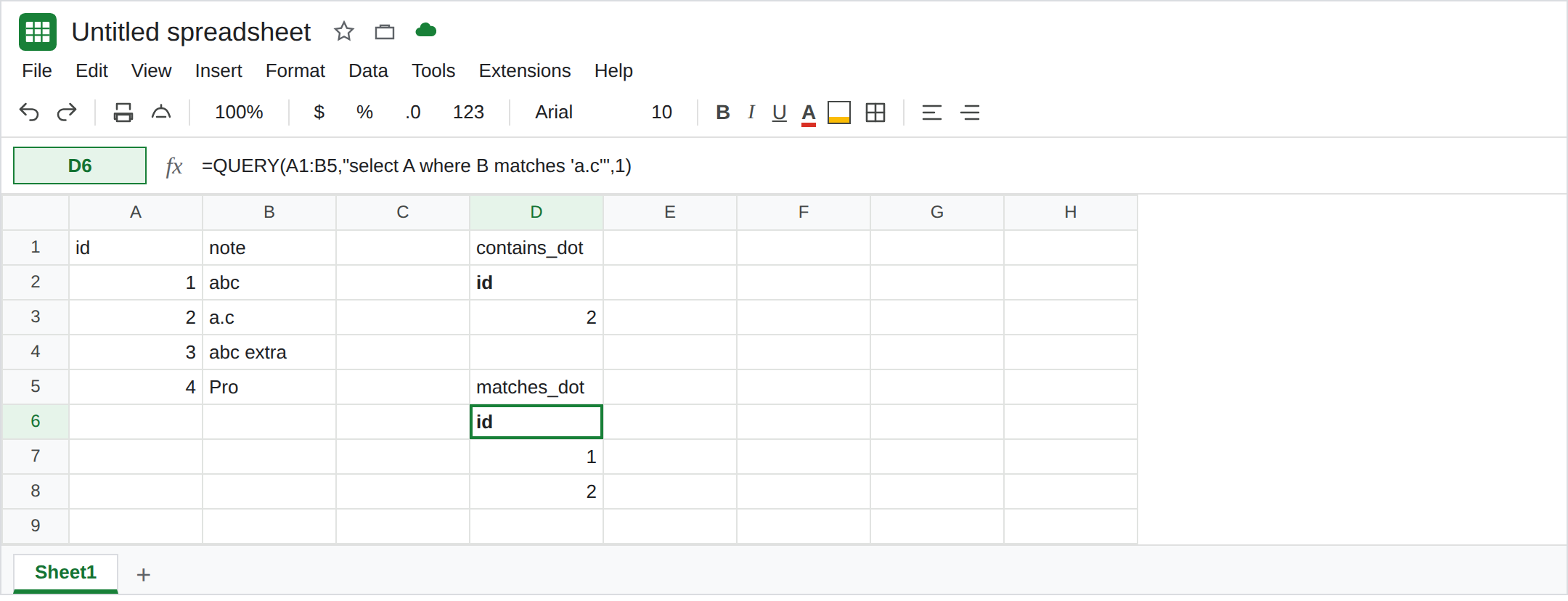
id, B1note. A21, B2abc. A32, B3a.c. A43, B4abc extra. A54, B5Pro. Four notes. Only B3 contains a period.
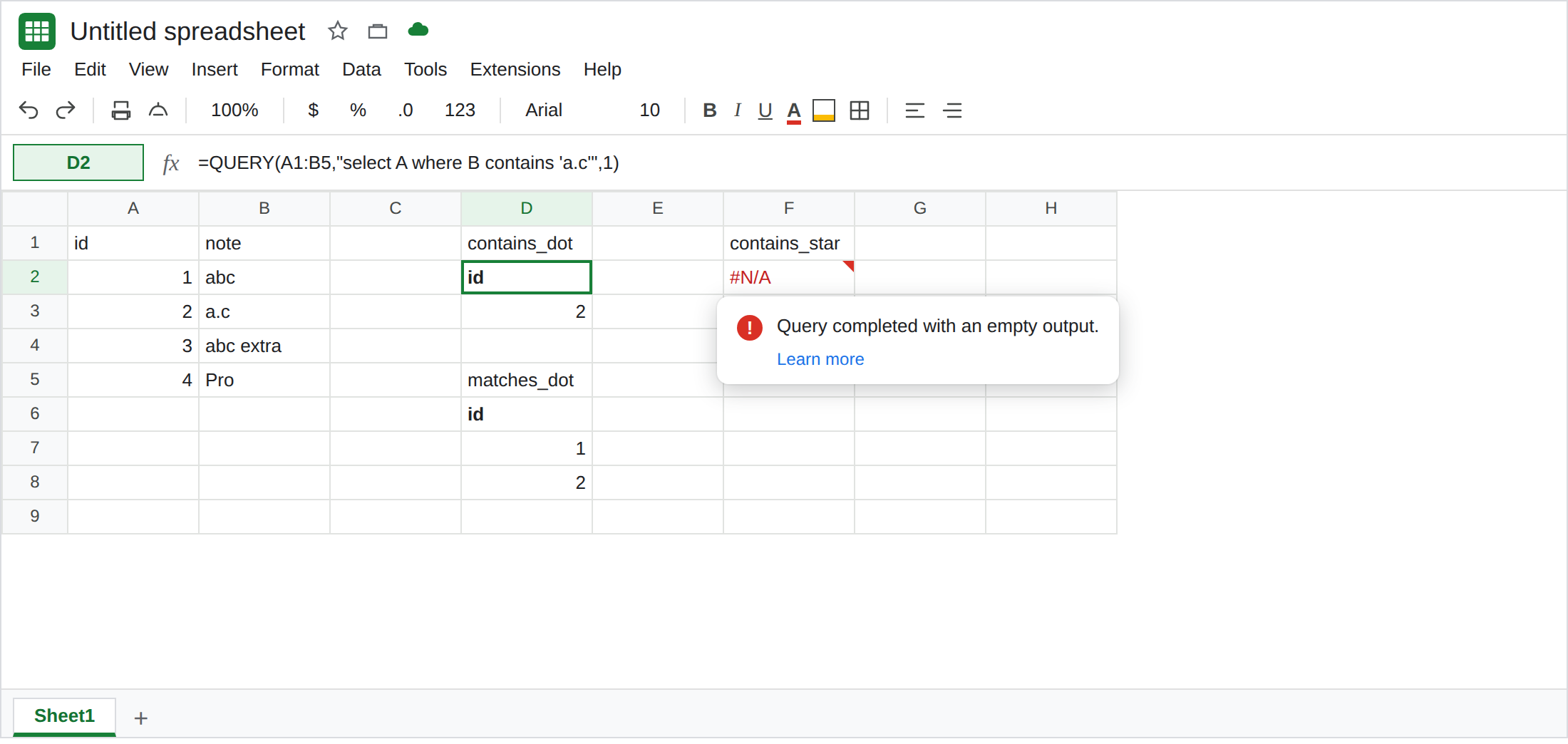
contains is literal. In D1 type contains_dot. In D2 enter =QUERY(A1:B5,"select A where B contains 'a.c'",1). The spill is id / 2. The cell a.c contains those three characters. abc does not contain a period, so row 1 is out. Leave D2 as that one id. It is not an error.
matches uses the dot, and the whole cell. In D5 type matches_dot. In D6 enter =QUERY(A1:B5,"select A where B matches 'a.c'",1). The spill is id / 1 / 2. abc matches because the dot stands for b. a.c matches because a dot also matches a period. abc extra does not match: the pattern is three characters long and the cell is longer. There is no error triangle. Leave D6 as ids 1 and 2.
A regex typed into contains matches nothing. In F1 type contains_star. In F2 enter =QUERY(A1:B5,"select A where B contains '.*'",1). #N/A. Tooltip: Query completed with an empty output. No note contains a period followed by a star. .* was not “anything.” Leave F2 broken. The same letters in matches are the regex “the whole cell, any characters”: where B matches '.*' returns every id. That is a different operator.
matches without a prefix and suffix misses a longer cell. In F4 type matches_pro. In F5 enter =QUERY(A1:B5,"select A where B matches 'Pro'",1). The spill is id 4 only. In F7 enter =QUERY(A1:B5,"select A where B contains 'Pro'",1). Also id 4 on this sheet, because nothing else has those letters. The operators diverge when the cell is longer than the pattern. matches '.*Pro.*' would keep a cell that merely contains Pro. contains 'Pro' already does that, and the dot-star is unnecessary. The Pro versus Processor table is QUERY contains.
What is actually wrong
Section titled “What is actually wrong”contains 'a.c'searches fora,.,cin that order. Regex characters are not special. D2 keeps row 2 only.matchesis RE2, and the match is the entire cell.a.cis “a, any one character, c,” and then the cell must end.abc extrafails.Canadafailsmatches 'an'for the same reason. Google’s reference states that this is not a global search.contains '.*'is a search for two characters. Empty output#N/Ahere means those characters are absent, not that the table is empty. See QUERY no rows for awherethat matches nobody for a different reason. The tooltip text is the same. The pattern is the difference.- Case is still significant on both operators.
matches 'abc'does not matchABC. Fold withlower(B)if you mean to. That case miss oncontainsis the other page. - Unquoted
contains a.cnever compares. It is Unable to parse query string. See QUERY parse string. D2 and D6 are quoted. They ran.
FILTER with REGEXMATCH is a different engine and a substring test unless you anchor the pattern. See FILTER + REGEXMATCH.
Leave F2 as the empty contains '.*'. Leave D2 and D6 as the two spills so literal and regex stay side by side.
Pick the operator for the characters you typed. A period that is data stays in contains 'a.c' (D2, id 2). A period that means “any character,” and a cell that should be exactly three characters, stays in matches 'a.c' (D6, ids 1 and 2). A note that only needs those letters somewhere inside uses contains 'abc', which hits abc and abc extra and misses a.c.
Whole cell, with regex, on purpose. where B matches 'abc( extra)?' is the pattern that keeps abc and abc extra and drops a.c. If you did not want regex, do not start the pattern with .*.
Do not wrap F2 in IFNA until you know you meant a literal dot-star. See IFERROR vs IFNA. IFNA will not turn contains into matches.
If a pattern with . or * returns the wrong rows, read the operator. contains took the marks literally. matches took them as regex and required the whole cell. If the tooltip says the query completed with an empty output, the pattern matched nobody. Check for a literal .* before you delete the rows.