

QUERY ORDER BY a label alias is NO_COLUMN
Updated
QUERY can sort with order by a column id or an aggregate expression: order by sum(B) desc. It cannot sort by the header you set in label. The word units in label sum(B) 'units' is display text. order by units is #VALUE!, and the tooltip names NO_COLUMN: units. Google’s query language says you cannot use a label value in place of an id.
A missing comma inside label is QUERY LABEL syntax. select A as units is QUERY LABEL alias. This page is the sort key. Keep the Google Sheets UI in English. Locale United States.
Recreate it on a blank sheet
Section titled “Recreate it on a blank sheet”- Open a blank spreadsheet. In A1 type
store, B1qty. A2East, B23. A3West, B310. A4East, B48. East totals11. West totals10. Descending by the total should list East first.
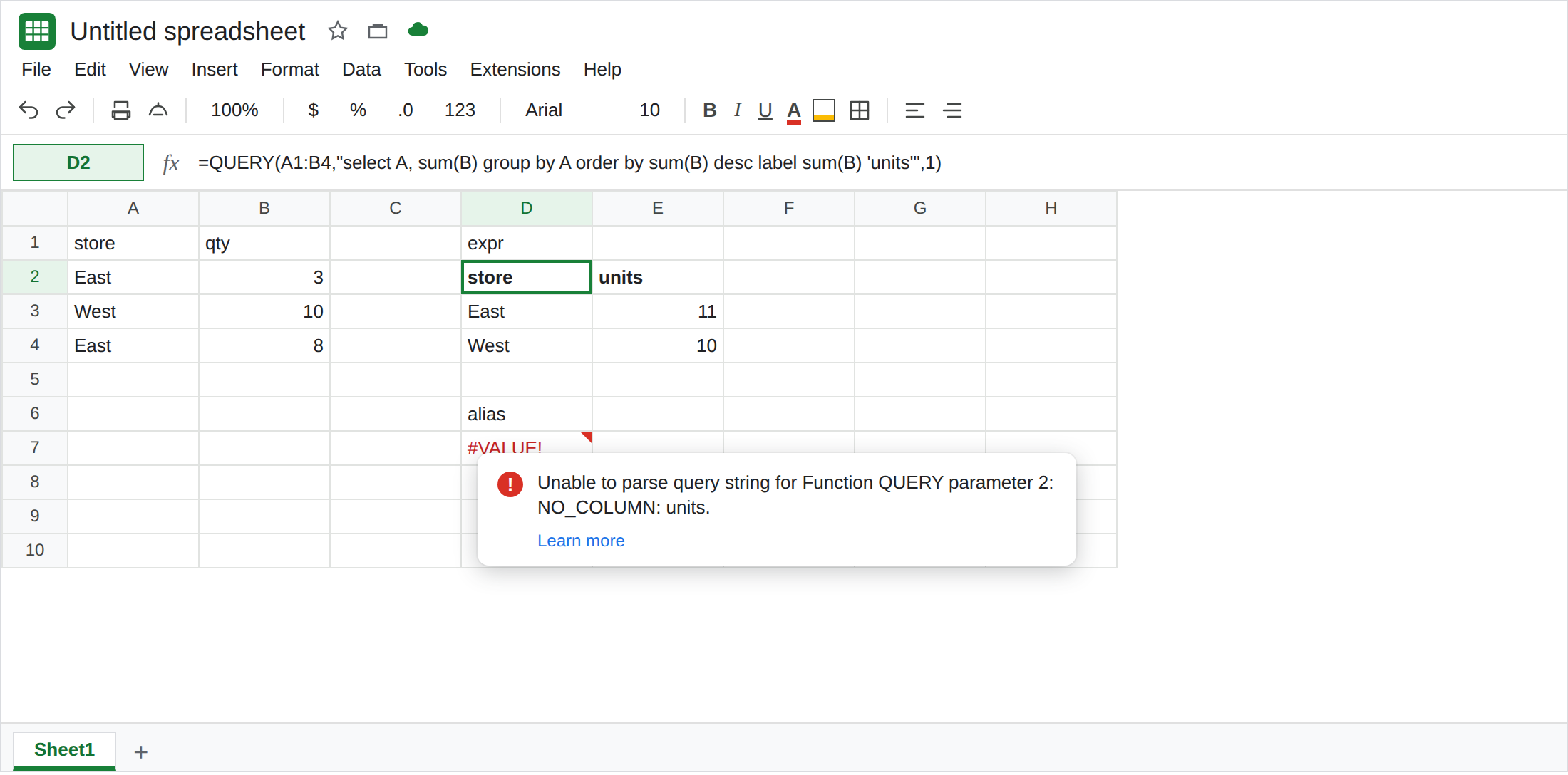
Sort by the expression, then rename. In D1 type expr. In D2 enter =QUERY(A1:B4,"select A, sum(B) group by A order by sum(B) desc label sum(B) 'units'",1). The spill header is store and units. The first data row is East 11, then West 10. order by uses sum(B), the same expression label renames. label is after order by. That block is the control.
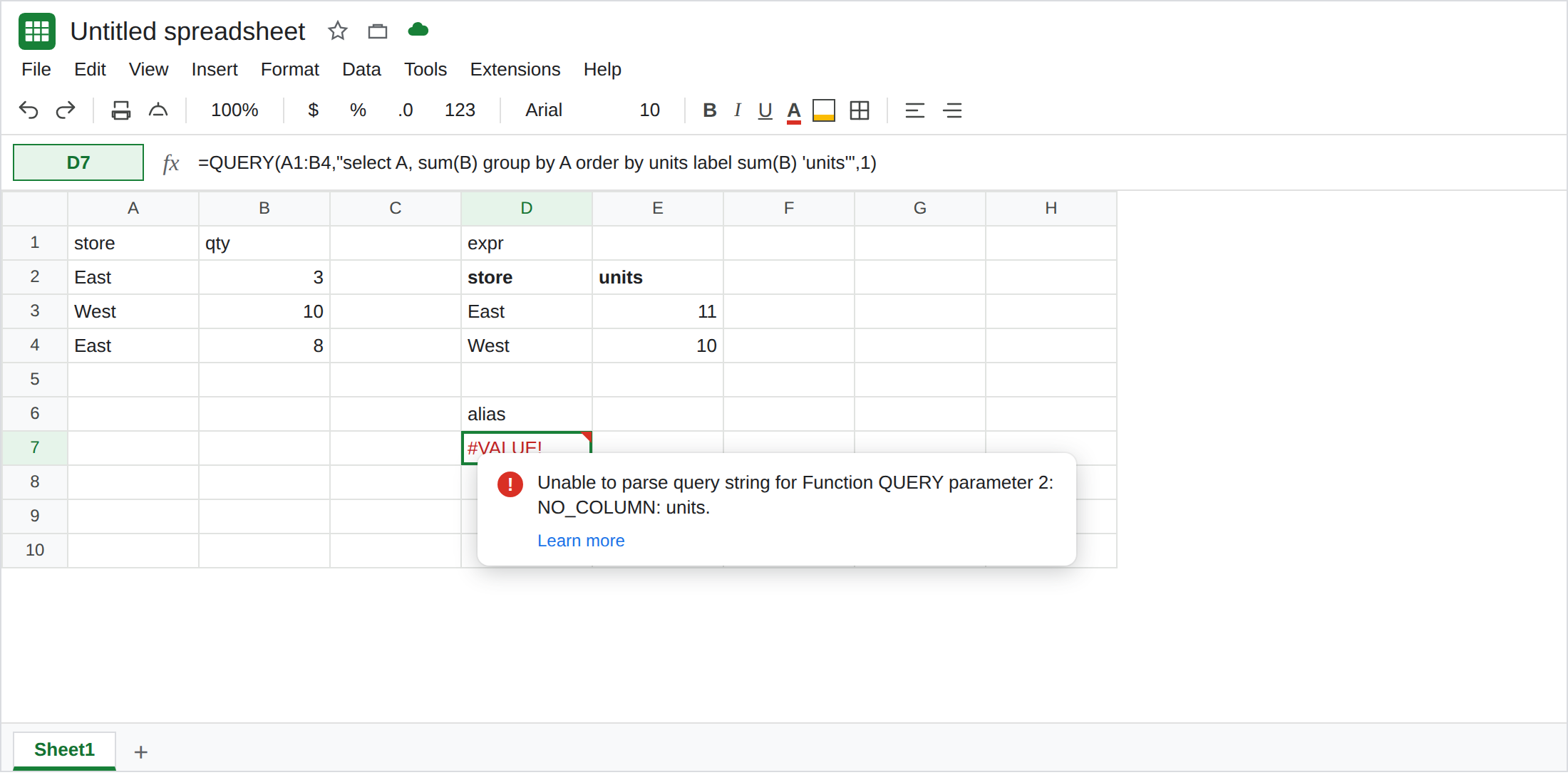
Order by the label word. In D6 type alias. In D7 enter =QUERY(A1:B4,"select A, sum(B) group by A order by units label sum(B) 'units'",1). #VALUE!. The tooltip is Unable to parse query string for Function QUERY parameter 2: NO_COLUMN: units. There is no column units in A1:B4. The header does not exist until the query finishes, and it is not an id even then. Leave D7 broken.
The label clause put first. In F1 type late. In F2 enter =QUERY(A1:B4,"select A, sum(B) group by A label sum(B) 'units' order by sum(B) desc",1). #VALUE!. Unable to parse query string. sum(B) would have been a legal sort key. It sits after label, and label is not allowed to precede order by. Leave F2 broken. This one is clause order. D7 is a bad id. They are different strings.
A sheet-letter alias fails the same way. In F4 enter =QUERY(A1:B4,"select A, B order by store",1). NO_COLUMN: store (or a parse error that names store). store is the header in A1, not the id. The id is A. Leave F4 broken. order by A is the repair for a non-aggregate query.
What is actually wrong
Section titled “What is actually wrong”order byaccepts column identifiers and the output of aggregation, scalar functions, or operators.sum(B),A,Col2, andyear(A)(when A is a real date column) are in that set. The string you put inlabelis not.- The label is applied for display after the sort is decided. Naming the total
unitsdoes not create a field the rest of the statement can mention. A laterwhere units > 5fails for the same reason. - Clause order is
select,where,group by,pivot,order by,limit,offset,label,format. F2 has a legal expression in an illegal position. Fix the position before you rewritesum(B). NO_COLUMN: unitslooks like Col1 vs A. The range here isA1:B4, andA/Bare correct. The unknown id is the alias. Read the token afterNO_COLUMN.- An empty result is a different tooltip (Query completed with an empty output). See QUERY no rows. D7 did not sort an empty table. It did not run.
Leave D7, F2, and F4 broken. Leave D2 as East 11, West 10.
Repeat the expression. Keep D2: order by sum(B) desc and label sum(B) 'units'. Copy sum(B) from select into order by. Do not copy the quoted header.
On an array, order by Col or the aggregate. {A1:B4} uses order by sum(Col2) desc label sum(Col2) 'units'. order by units is still NO_COLUMN. See QUERY LABEL syntax for the comma between label pairs.
Do not wrap D7 in IFERROR. You would hide NO_COLUMN and lose the ranking. See IFERROR vs IFNA.
If the tooltip says NO_COLUMN and the token is a header you invented in label, order by the expression you selected. If the tooltip is a parse error and order by sits under label, move order by up. If the rows are present and only the rank is wrong, the id is valid and the direction (asc / desc) is the part to read.