

MAKEARRAY indexes start at 1, so a 0-based LAMBDA shifts every cell
Updated
MAKEARRAY(rows, columns, LAMBDA) calls the lambda once per cell. The two names are the row index and the column index inside the new grid, and both start at 1. They are not sheet row numbers, and they are not 0-based positions. Subtracting 1 and passing that to INDEX asks for row 0 on the first output row. Row 0 is the whole column, which is an array, and MAKEARRAY rejects it. Adding 1 “to skip a header that is not there” reads the next source row, so every value lands one row low and the formula can still look tidy.
Wrong arity and a lambda that returns {r,c} are MAKEARRAY LAMBDA. What row 0 means on its own is INDEX row 0. This page is the off-by-one. Keep the Google Sheets UI in English. Helper names stay English: LAMBDA, MAKEARRAY.
Recreate it on a blank sheet
Section titled “Recreate it on a blank sheet”- Open a blank spreadsheet. In A1 type
10, B120, C130. A240, B250, C260. A370, B380, C390. A 3×3 block. No header row. You will build a 2×3 view of it.
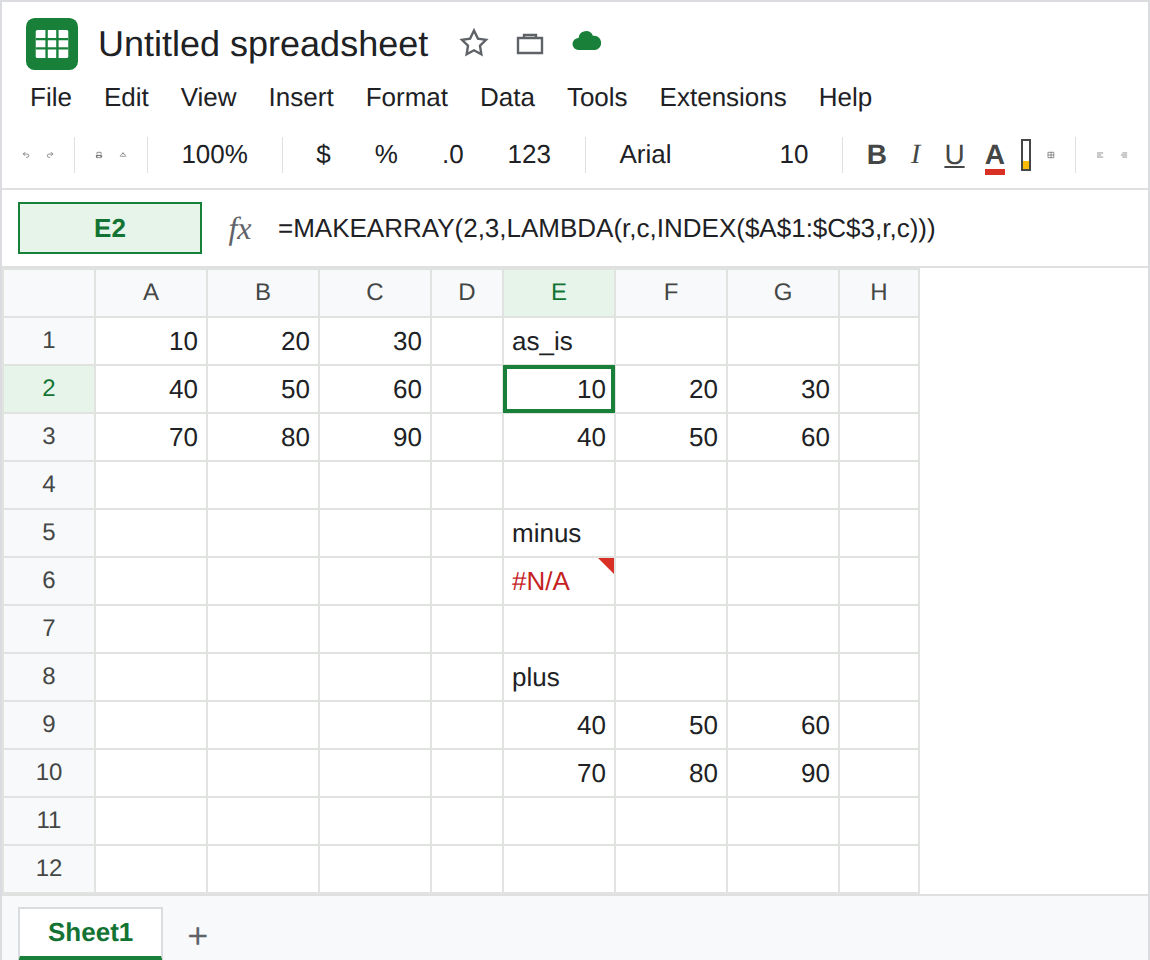
Indexes as Sheets sends them. In E1 type as_is. Leave E2:G3 empty. In E2 enter =MAKEARRAY(2,3,LAMBDA(r,c,INDEX($A$1:$C$3,r,c))). The spill is 10, 20, 30 and 40, 50, 60. r was 1 on the first result row, so INDEX read source row 1. That block is the control.
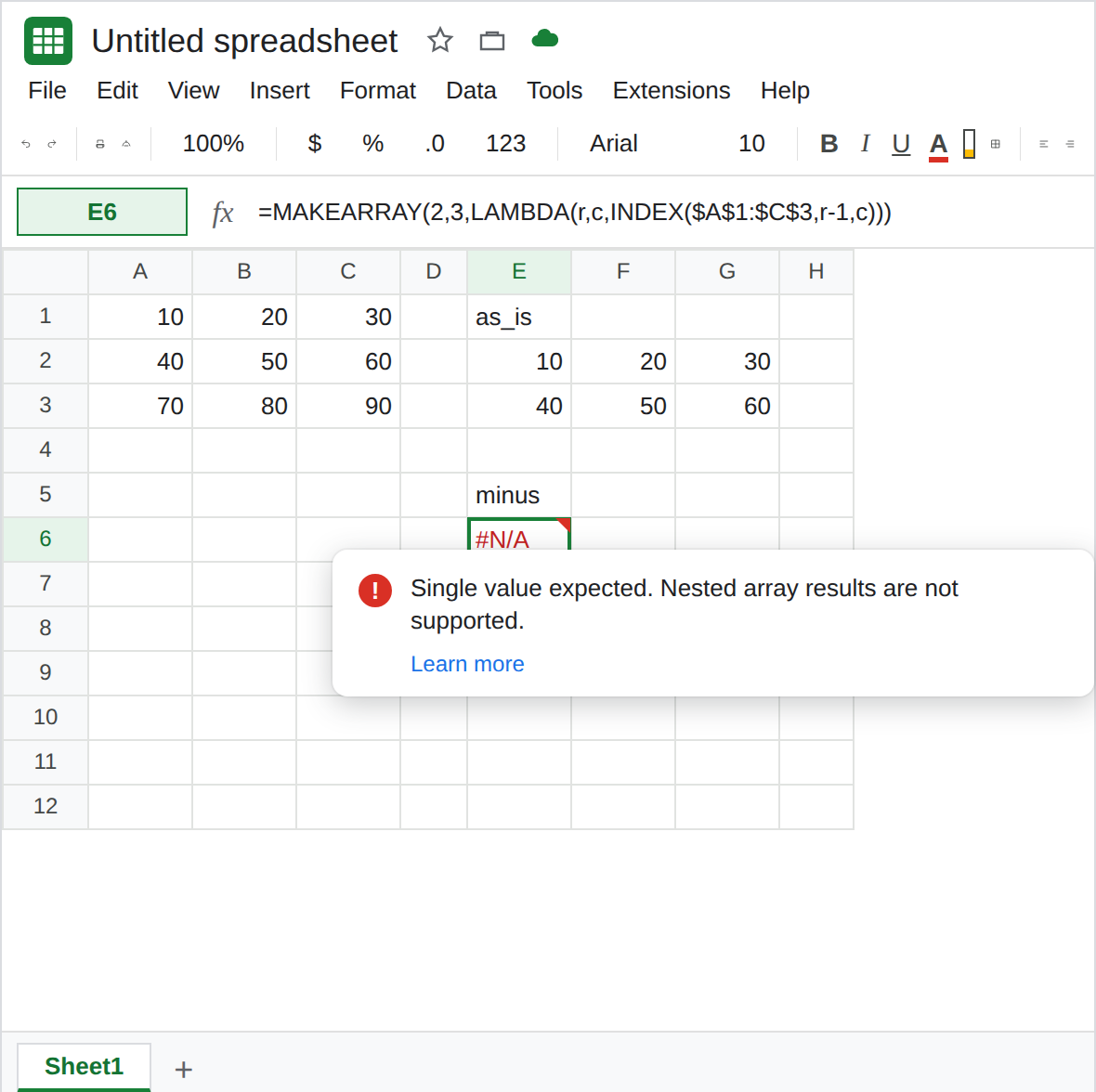
Subtract 1, as if the index were 0-based. In E5 type minus. In E6 enter =MAKEARRAY(2,3,LAMBDA(r,c,INDEX($A$1:$C$3,r-1,c))). The first call uses r-1 = 0. INDEX with row 0 returns the whole column, not the first cell. The lambda’s return is an array. E6 is #N/A or #VALUE!. Tooltip: Single value expected. Nested array results are not supported. Leave E6 broken. It is not “cell A1 was blank.”
Add 1, and every cell moves. In E8 type plus. In E9 enter =MAKEARRAY(2,3,LAMBDA(r,c,INDEX($A$1:$C$3,r+1,c))). The spill is 40, 50, 60 and 70, 80, 90. No triangle. The first source row (10, 20, 30) is missing. Each output cell is the source cell one row down. r was already 1. r+1 started on source row 2. Leave E9 as that shifted grid.
A code grid, same off-by-one. In I1 type codes. In I2 enter =MAKEARRAY(2,3,LAMBDA(r,c,r*10+c)). The spill is 11, 12, 13 and 21, 22, 23. If you wanted 0, 1, 2 on the first row because you counted from zero, these numbers are each one step high. The lambda ran. The indexes were 1-based. Leave I2 as 11–23.
What is actually wrong
Section titled “What is actually wrong”- The first output cell is
(r,c) = (1,1)even when the formula sits in E2. Adding the sheet’s row number double-counts. Subtracting 1 assumes a 0-based API. Sheets did not use one. INDEX(range, 0, c)means all rows of columnc. See INDEX row 0. InsideMAKEARRAYthat array is a nested return. E6. The same tooltip appears when the lambda is{r,c}. See MAKEARRAY LAMBDA. E6’s lambda returns oneINDEX. The index is0.r+1on a grid that has a spare row does not error. E9 is a full spill of the wrong cells. Checking E9 against A1, not against A2, is the test.- An index past the block is a different failure.
=MAKEARRAY(3,3,LAMBDA(r,c,INDEX($A$1:$C$2,r,c)))asks for source row 3, and the source only has two rows. That#REF!says the row is out of range. E9 stayed inside A1:C3. E9 is not that#REF!. - One lambda name is still the arity error (Wrong number of arguments to LAMBDA). E6 has two names. Do not add a third name to “fix” the shift.
Leave E6 broken. Leave E9 as the shifted 40–90 so the off-by-one stays visible.
Pass r and c through. Keep E2: =MAKEARRAY(2,3,LAMBDA(r,c,INDEX($A$1:$C$3,r,c))). 10, 20, 30 / 40, 50, 60.
Skip a real header by starting the source range lower, not by adding 1 to r. If row 1 becomes labels, INDEX the block A2:C4 and still pass r and c unchanged. The new grid’s first cell is still index 1.
Zero-based codes, if you actually want them. =MAKEARRAY(2,3,LAMBDA(r,c,(r-1)*10+(c-1))) spills 0, 1, 2 and 10, 11, 12. The subtraction is in the arithmetic you display. It is not applied to INDEX unless the source really has a row 0, which it does not.
Do not wrap E6 in IFERROR. Row 0 is still the whole column. See IFERROR vs IFNA.
If the spill is one row lower than the source, look for r+1. If the tooltip says Single value expected and the index expression can be 0, stop subtracting. If the tooltip says the row is outside the range, the source block is shorter than the grid you asked MAKEARRAY to build.