

A SUBTOTAL grand total skips nested SUBTOTAL rows, so it looks too small
Updated
SUBTOTAL(function_code, range) skips other SUBTOTAL results inside that range. It does this so a grand total can sit on the same column as the category subtotals and not count the details twice. The skip is on purpose. It also makes the grand total look too small if you add the visible numbers by eye, because your eye includes the category subtotal row and SUBTOTAL does not. Detail 10 and 20, a subtotal cell showing 30, and a further detail 40 display as 100. The grand SUBTOTAL is 70. SUM of the same cells is 100, and that 100 is the double count.
Code 9 versus 109 for rows you hid by hand is SUBTOTAL hidden rows. This page is the nested-function skip, with nothing hidden. Keep the Google Sheets UI in English. Sheet Error is an independent formula-error library, not a Google product.
Recreate it on a blank sheet
Section titled “Recreate it on a blank sheet”- Open a blank spreadsheet. In A1 type
qty. A2 type10. A3 type20. These two are typed numbers, not formulas.
A category subtotal. In A4 enter =SUBTOTAL(9,A2:A3). A4 is 30. Code 9 is SUM. It sees 10 and 20 and does not see another SUBTOTAL inside that small range.
More detail, then a grand total over the whole block. A5 type 40. In A6 enter =SUBTOTAL(9,A2:A5). A6 is 70. The range includes A4, and A4 is a SUBTOTAL, so 30 is left out. The total is 10+20+40. It is not 10+20+30+40. Leave A6 as 70.
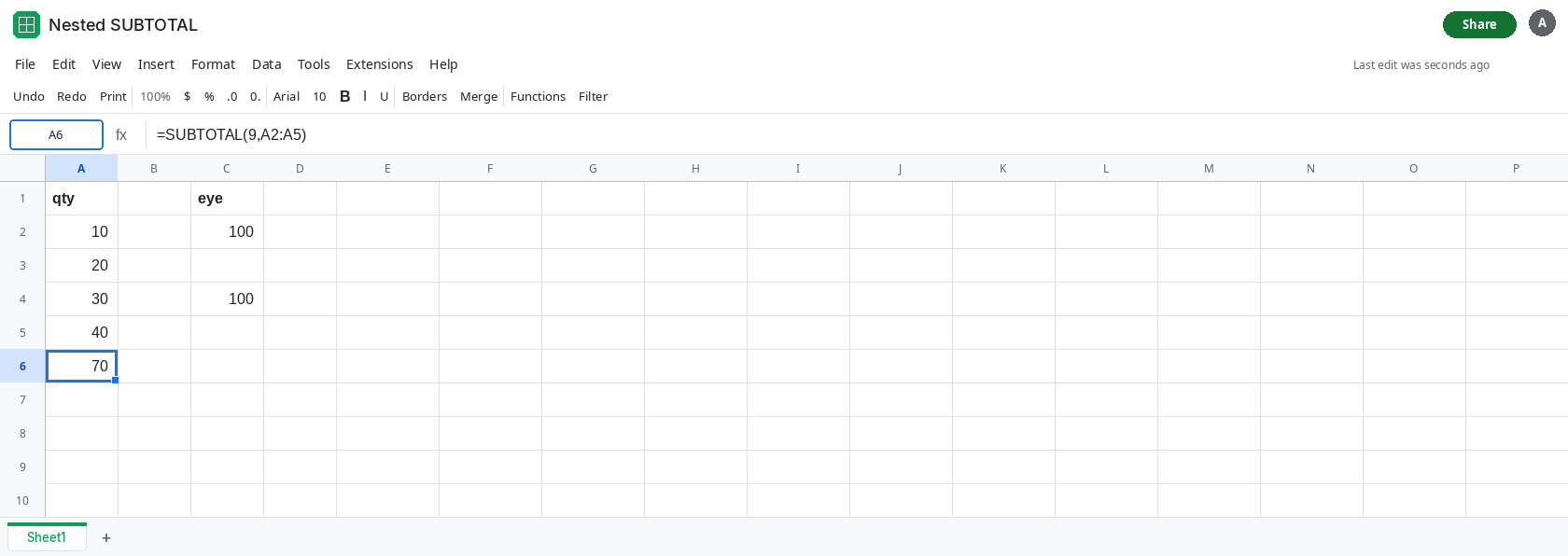
The eye and SUM both make 100. In C1 type eye. In C2 enter =A2+A3+A4+A5. C2 is 100. You added the subtotal row as if it were detail. In C4 enter =SUM(A2:A5). C4 is 100 as well. SUM does not skip SUBTOTAL cells. It adds 30 on top of the 10 and 20 already inside that 30. C4 double-counts the first group. A6 is the total that does not. Leave C4 as 100 so the double count stays visible.
Nothing is hidden. Do not filter the sheet and do not hide a row. A6 is 70 with every row on screen. If you hide a row and the total moves, that is SUBTOTAL hidden rows, code 9 versus 109. Come back to this page with the rows visible.
If the detail cells are themselves SUBTOTAL, the grand total can be 0. In E2 enter =SUBTOTAL(9,A2). E2 is 10, because A2 is a number, not a SUBTOTAL. Replace the idea, without editing A2: a column where every “detail” is =SUBTOTAL(9, some other cell) will be ignored by an outer SUBTOTAL over that column. The outer result is 0 when there is no plain number left. A6 is 70 and not 0 because A2, A3, and A5 are plain numbers.
Leave A6 as 70 and C4 as 100.
What is actually wrong
Section titled “What is actually wrong”- The skip is the feature. A grand total written as
SUBTOTALover a column that already contains categorySUBTOTALrows is supposed to add the details once.70is that answer.100counts the first group twice. - It looks too small only when the visible column is treated as a list of independent numbers. A4 is not independent. It is
10+20already. SUMwill not save you from a “too small” feeling without creating the double count. UseSUMonly on the detail rows, with the subtotal rows outside the range.- Code
9and code109both skip nestedSUBTOTAL. The hundred you add to the code is about manually hidden rows, not about nested subtotals. See SUBTOTAL hidden rows. AGGREGATEin Excel has its own option bits for nested subtotals. Sheets has noAGGREGATE. See AGGREGATE codes. On this sheet the function that skips nested totals isSUBTOTAL.
This is not a filter. If a row is hidden, read the hidden-row page before you change A6.
Leave A6 as 70 and C4 as 100. A6 is the correct grand total of the details. C4 is the double count.
Keep category totals as SUBTOTAL, and point the grand total at the whole column. A6 is already that pattern. Label A4 group and A6 grand in column B so the 70 is not compared to a mental sum that includes A4. If the grand total must equal the sum of the category lines only, point it at those lines with SUM, not at the details: =SUM(A4) in this tiny sheet, or =A4 . Do not also include A2:A3 in that second total.
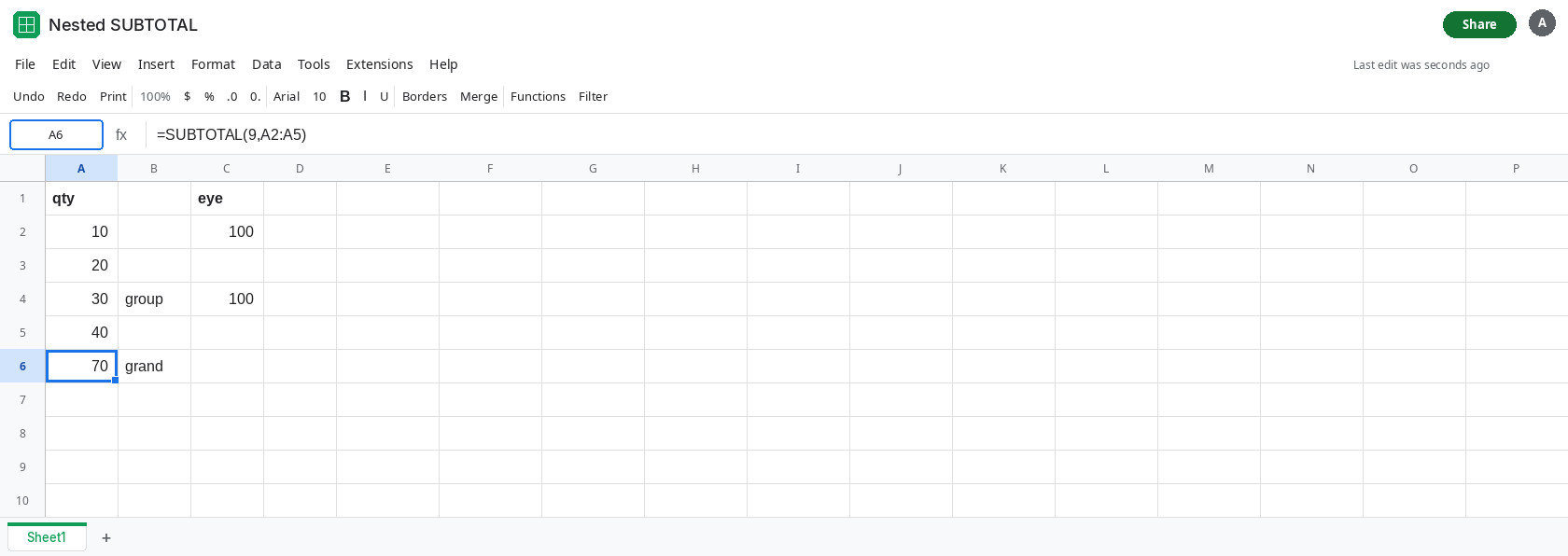
If the grand total is 0, the range contains only other SUBTOTAL formulas. Point the grand total at the original numbers, or change the detail rows to values. Outer SUBTOTAL will keep ignoring inner SUBTOTAL.
If you need the hidden-row behavior at the same time, use 109 for the grand total when manually hidden rows should drop out, and still expect nested SUBTOTAL rows to drop out. Hiding nothing should leave a 109 grand total at the same 70 as A6.
If A6 is 70 and adding the visible cells makes 100, the difference is the nested subtotal, and A6 is the one that does not double-count. If A6 equals C4, the category row is a typed number or a SUM, not a SUBTOTAL, so it was included. If the total changes when you hide a row, you are on the hidden-row page.