

TEXT with "$#,##0.00" keeps a dollar sign the locale did not ask for
Updated
TEXT(number, format) prints the pattern you wrote. In "$#,##0.00" the $ is a dollar sign. It is not “whatever currency this file uses.” Format → Number → Currency on a United Kingdom spreadsheet shows £. The same number passed through that TEXT pattern still comes back with $. No triangle. The label is the wrong currency, and it is text, so later math breaks separately.
This page is the symbol. An illegal pattern (*, a date code mixed with 0) is TEXT format code and is #VALUE!. Keep the Google Sheets UI in English. Locale is File → Settings → Locale.
Recreate it on a blank sheet
Section titled “Recreate it on a blank sheet”- Open a blank spreadsheet. File → Settings → Locale → United Kingdom. Leave Display language on English. Save. Argument separators may become semicolons. The formulas below use commas; if the cell shows Formula parse error, switch the separators to semicolons or set the locale back to United States only long enough to see the
$, then return. The parse error itself is locale parse error. This page assumes the formula ran.
Currency format on the number, the control. In A1 type n. In A2 type 1234.5. Select A2. Format → Number → Currency. On this UK file A2 displays a pound amount, not a dollar amount. ISNUMBER(A2) is TRUE. The menu followed the locale.
TEXT ignores that menu. In C1 type text. In C2 enter =TEXT(A2,"$#,##0.00"). C2 shows $1,234.50 (the separators in the output can follow the locale, so you may see a different thousands mark). The symbol is $. ISTEXT(C2) is TRUE. The UK currency format on A2 did not move into C2. Leave C2 as that dollar string.
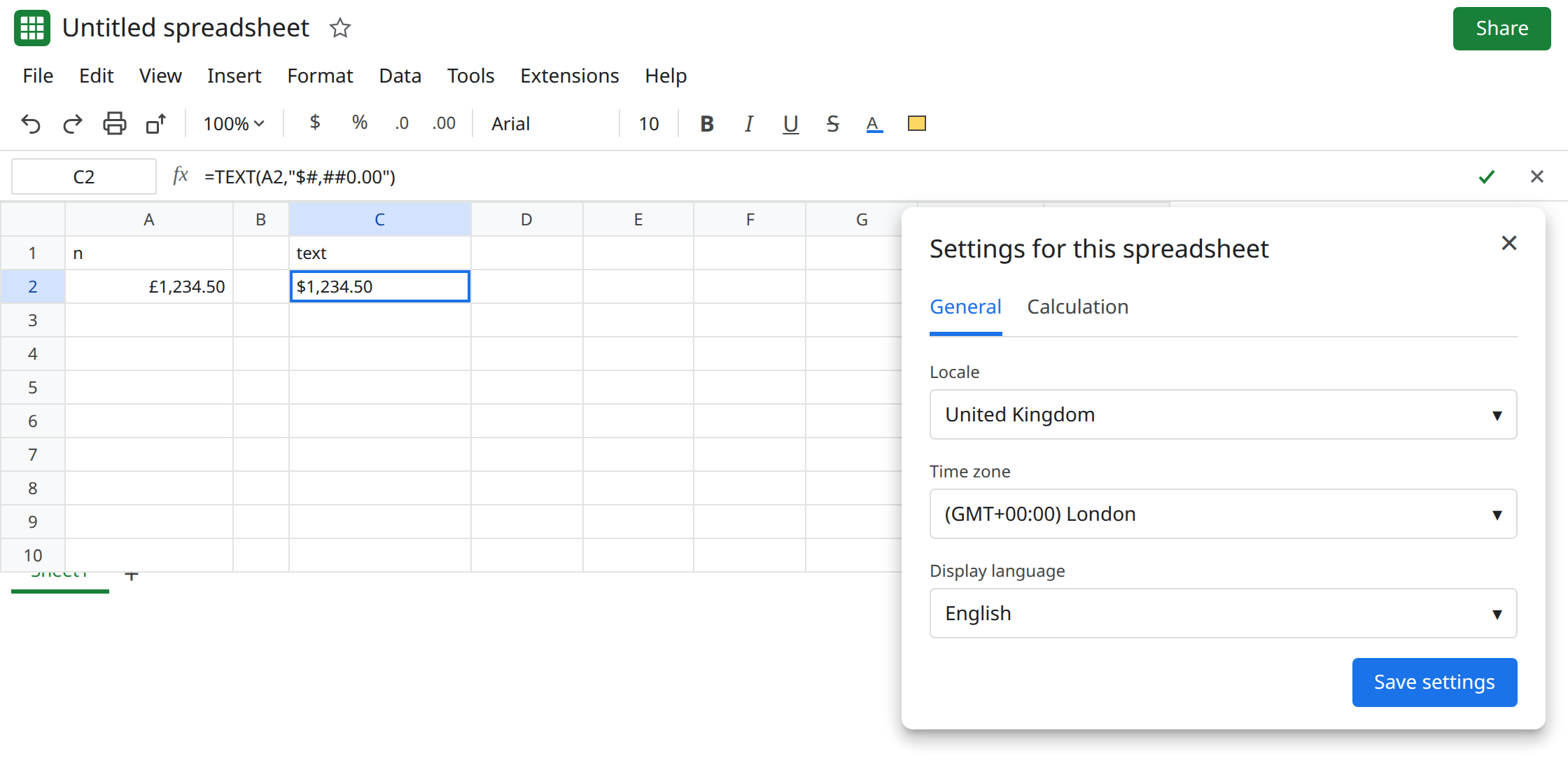
A pattern Sheets rejects, so you do not mix the pages. In C4 enter =TEXT(A2,"0.00*"). C4 is #VALUE!. The asterisk is illegal. That is TEXT format code. C2 has no triangle. The pattern ran. The symbol is just the wrong one.
Decimal comma is not this symbol. A pattern copied from a comma-decimal locale can shape the digits differently and still not error. See decimal comma locale. C2’s bug is $ versus £, not the comma inside the format code.
What is actually wrong
Section titled “What is actually wrong”TEXTdoes not look up Format → Number → Currency. The second argument is the whole design.$in that string is the character$on a UK file and on a US file.- The number placeholders still mean “digit” and “thousands.” Sheets writes the locale’s separator characters into the result. You can get a pound-shaped expectation and a dollar-shaped string with European separators. Read the symbol first.
- The result is text.
=C2+1is#VALUE!. That second error is real, and it is not the currency bug. See wrong type. If you need a number, format A2 and do not callTEXT. - Stripping a currency format off a numeric cell is
TO_PURE_NUMBER, which returns1234.5and does not print£. See TO_PURE_NUMBER. It will not invent the symbolTEXTomitted.
This is not GOOGLEFINANCE of a currency pair. See currency pair. C2 never looked up a rate. It printed a pattern.
Leave C2 as the dollar string so the mismatch stays visible. Leave A2 as the locale currency format.
Put the symbol you want in the pattern. In E1 type pounds. In E2 enter =TEXT(A2,"£#,##0.00"). E2 shows a pound amount as text. For euro, the pattern is "[$€]#,##0.00" or "€#,##0.00". The [$…] form is how a custom format pins a symbol. It is still text.
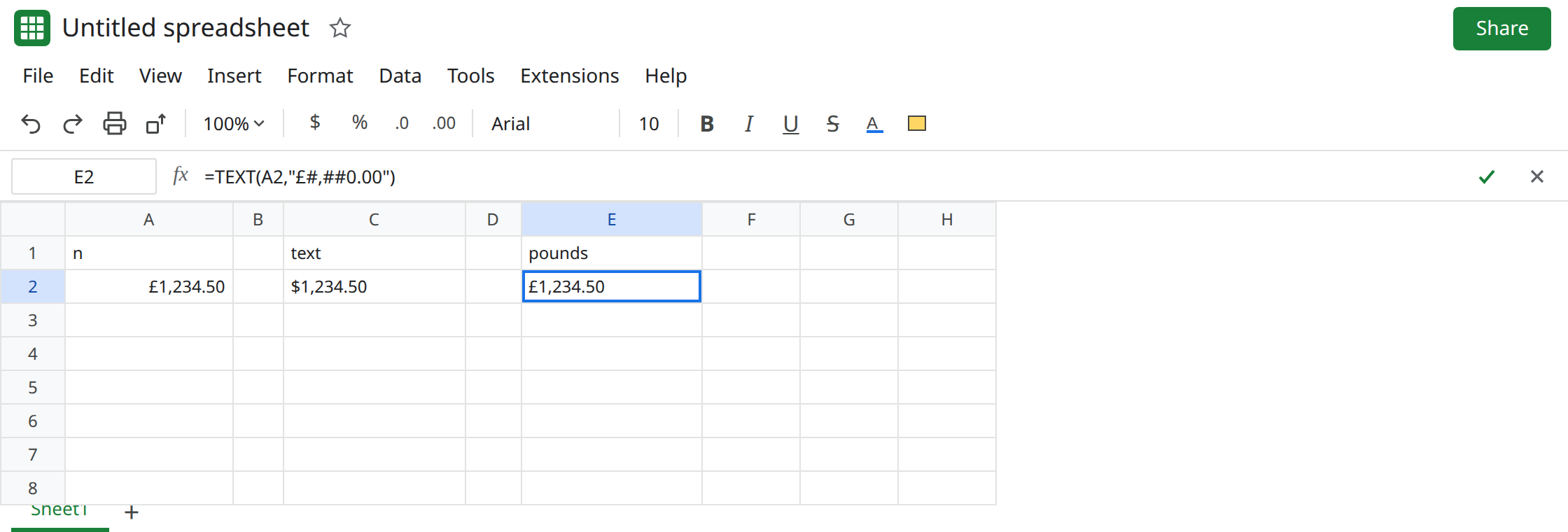
If the cell should stay a number, do not use TEXT. Select A2 and use Format → Number → Currency, or a custom format whose symbol matches the report. Math stays on A2. Use TEXT only for a label, a file name, or a joined sentence.
Do not change the spreadsheet locale to United States just so $ matches the pattern. Every date and every argument separator in the file moves with it. Change the pattern.
If TEXT shows $ and the file’s currency format shows £ or €, the $ in the pattern is why. If TEXT is #VALUE!, the pattern is illegal and you are on the format-code page.