

RAND and RANDARRAY reshuffle the whole model on every edit
Updated
RAND(), RANDBETWEEN(), and RANDARRAY() do not store a sample. They draw again whenever the spreadsheet recalculates. Recalculation is not “when this cell’s inputs change.” Typing in an empty cell is enough. A chart of those numbers jumps. A VLOOKUP keyed on them misses. A few hundred copies make every edit wait on new random work you did not ask for.
This page is that storm. A RANDARRAY that cannot spill because a neighbor is occupied is RANDARRAY spill, and that page already notes volatility. Here the spill is legal and the sheet still misbehaves. Keep the Google Sheets UI in English.
Recreate it on a blank sheet
Section titled “Recreate it on a blank sheet”- Open a blank spreadsheet. In A1 type
one. In A2 enter=RAND(). A2 is a decimal between 0 and 1. Write it down.
An unrelated edit redraws it. Click D1. Type x. Delete it. A2 changes. The formula does not mention D1. Leave A2 as a live RAND.
A block that feeds a chart. In C1 type block. Leave C2:E6 empty. In C2 enter =RANDARRAY(5,3). Fifteen decimals spill. Insert → Chart, and set the data range to the spill. Note the columns. Edit D1 again (type y, then delete it). The spill changes and the chart moves. Nothing in the chart setup was wrong. The inputs are new numbers.
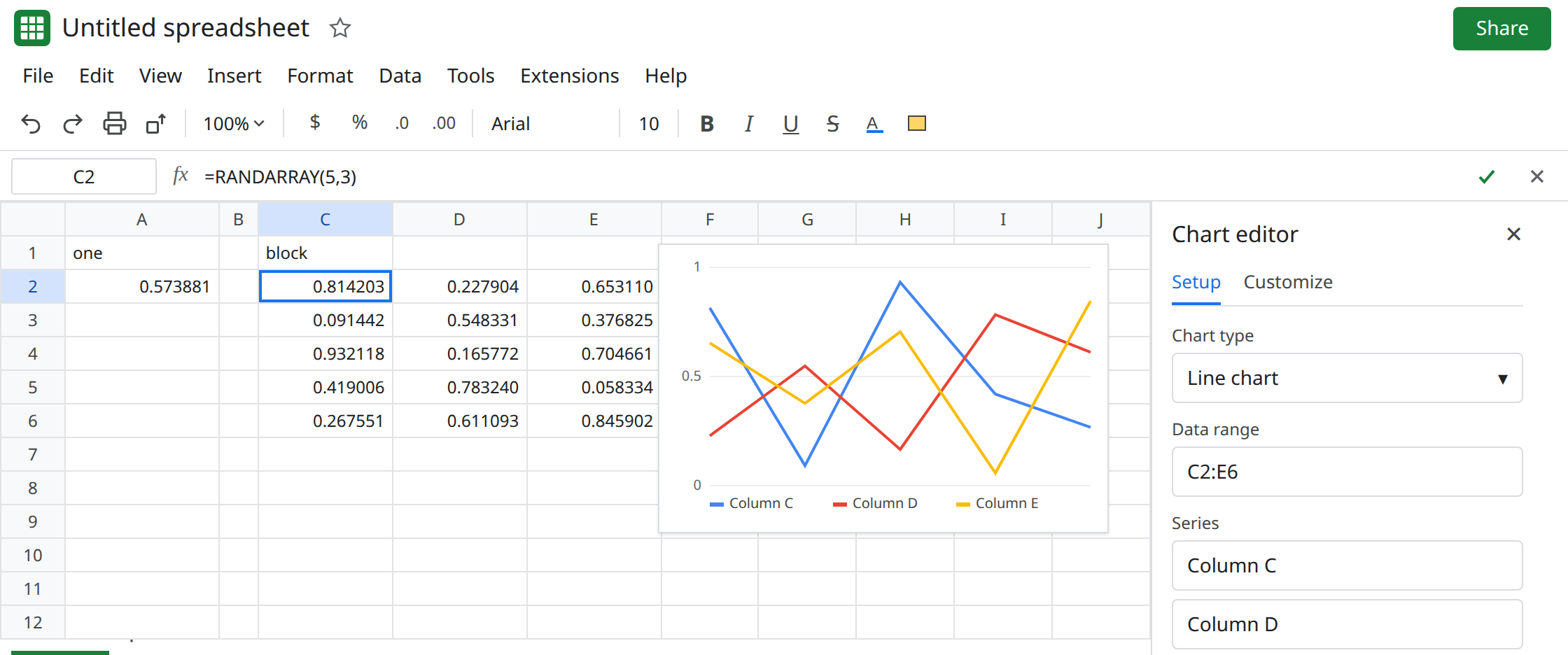
A column of copies, the slow version. In G1 type many. In G2 enter =RAND(). Fill G2 down through G200. Edit D1 again. The column redraws. On a short sheet this is only a flicker. The same fill through thousands of rows, plus RANDARRAY on a dashboard, is the lag: every keystroke recalculates every volatile formula, not only the cell you edited. You do not need a triangle to be on this page.
A lookup that cannot stay hit. In I1 type key. In I2 enter =RANDBETWEEN(1,5). In K1 type name. K2 a. K3 b. In M2 enter =VLOOKUP(I2,K2:K3,1,FALSE). When I2 is 1 or 2 you get a letter. Edit D1. I2 changes. M2 becomes #N/A or a different letter. The table did not change. See VLOOKUP no match only if the key is stable and still misses. Leave I2 volatile so the miss can return.
A blocked spill (#REF!, Array result was not expanded) is not this recreate. See RANDARRAY spill.
What is actually wrong
Section titled “What is actually wrong”- Volatile functions recalculate on workbook changes.
RANDdoes not have a precedent you can narrow. Sheets cannot skip G2:G200 because you edited D1. That is the storm. RANDARRAYis one formula and still volatile. It is cheaper than two hundredRANDcalls, and it is still a new grid on every edit. Charts read the grid after each calc, so they animate.- Random numbers are a bad primary key. Exact
VLOOKUP/XLOOKUP/MATCHcompare the key they have now to a table that was built from the previous draw. The next edit invalidates both. - The sheet can also hit a calculation limit if the random grid is huge and other array formulas depend on it. The tooltip then is Calculation limit was reached, not a random-number error. See calculation limit. Shrink the draw before you simplify the other formula.
NOW()andTODAY()are volatile too. They do not reshuffle a distribution, but they do recalc on the same schedule. A timestamp copied down a column withNOWis NOW inside ARRAYFORMULA.
This is not a chart gap from #N/A in the series. See charts gap on error cells. This chart has no errors. The points moved.
Leave A2 and C2 live so you can still see a redraw. Leave the long fill if you want the lag visible.
Freeze a sample when the draw should stop. Select C2:E6. Edit → Copy, then Edit → Paste special → Values only onto a clear range, for example C8. C8:E12 are numbers. The formula bar is empty. Edit D1. C8 does not change. The chart should use C8:E12, not the spill. A2 can be frozen the same way if you need one stored decimal.
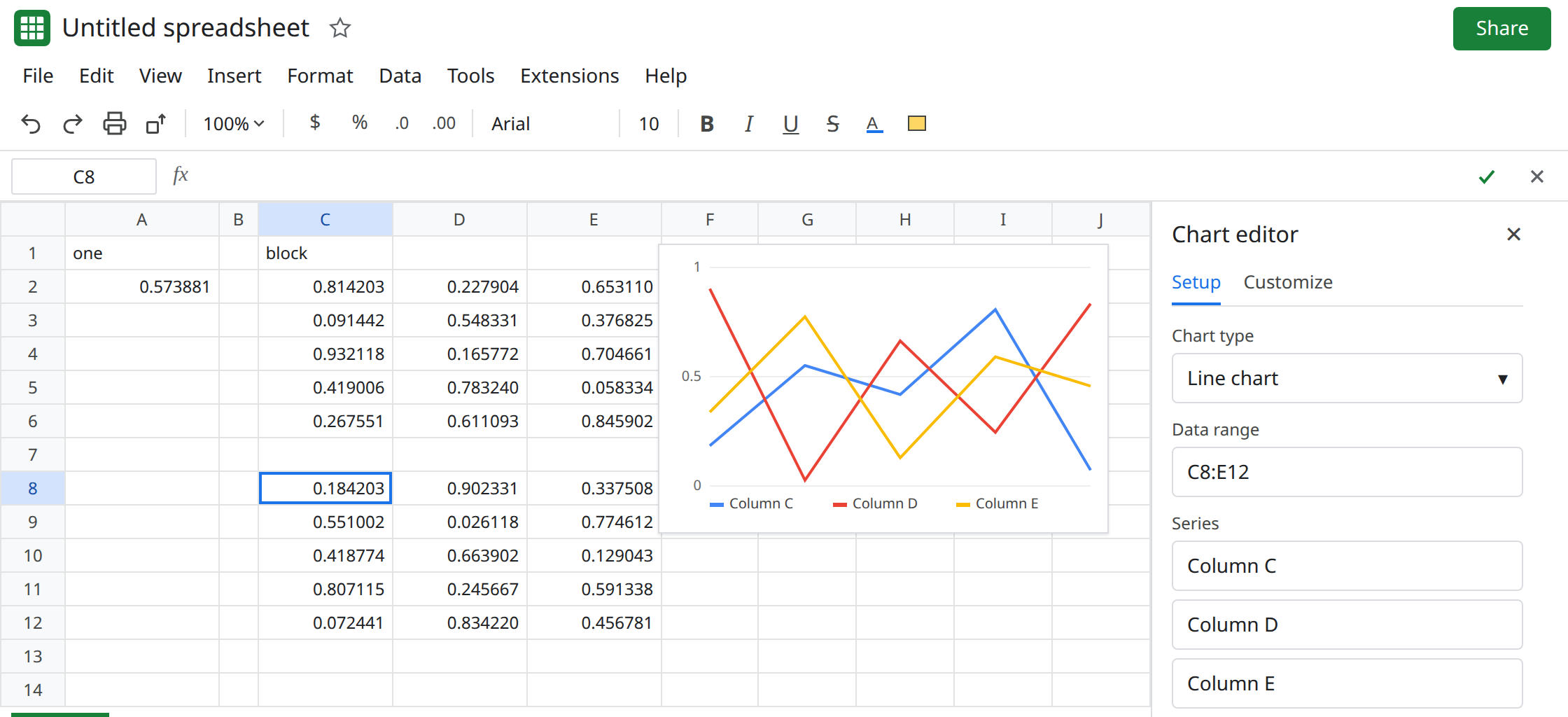
Keep one volatile formula, not a filled column. If the model needs a fresh draw on purpose, use a single RANDARRAY of the size you chart, and do not also fill RAND down hundreds of rows. Do not point VLOOKUP at the draw. Draw, paste values, then look up.
Do not wrap M2 in IFNA to hide keys that expire on every edit. See IFERROR vs IFNA.
If every edit changes numbers whose formulas are RAND, RANDBETWEEN, or RANDARRAY, volatility is working. Paste values to stop it. If the cell is #REF! because the spill is blocked, you are on the RANDARRAY spill page.