

LINEST verbose spills a stats block, and some of those cells are #N/A
Updated
LINEST(known_data_y, known_data_x, calculate_b, verbose) fits a line. Omit verbose and you get one row: slopes and the intercept. verbose TRUE returns five rows of statistics. With more than one x column the block is wider than the lower statistics, and the extra cells are #N/A. The fit did not fail. Those slots are empty on purpose.
A single predicted y is FORECAST array length. A blocked spill is SORT / UNIQUE spill. Keep the Google Sheets UI in English. Sheet Error is an independent formula-error library, not a Google product.
Recreate it on a blank sheet
Section titled “Recreate it on a blank sheet”- Open a blank spreadsheet. In A1 type
x1, B1x2, C1y. A21, B22, C22. A32, B31, C34. A43, B44, C45. A54, B53, C57. Four rows. x1 and x2 are not copies of each other.
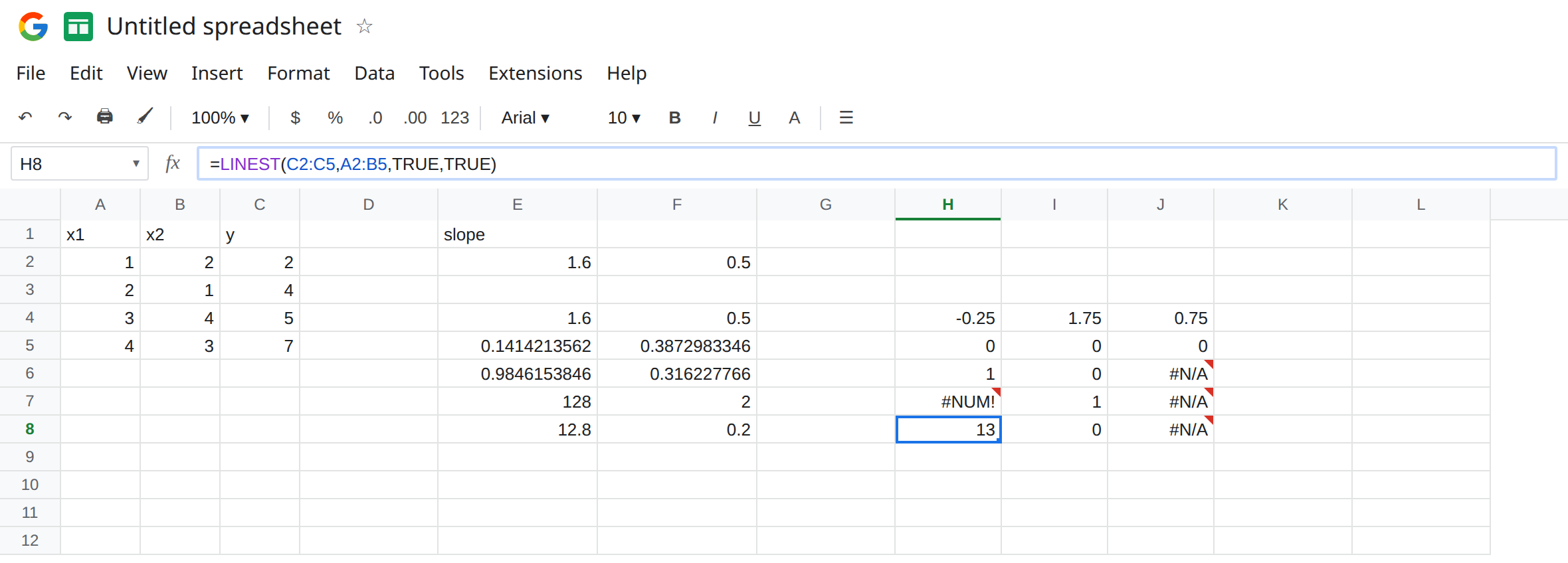
One x, coefficients only. In E1 type slope. In E2 enter =LINEST(C2:C5,A2:A5). E2 is the slope 1.6. F2 is the intercept 0.5. One row. No #N/A. That row is the control. The line is a fit: at x of 1 it is about 2.1, and the actual y is 2.
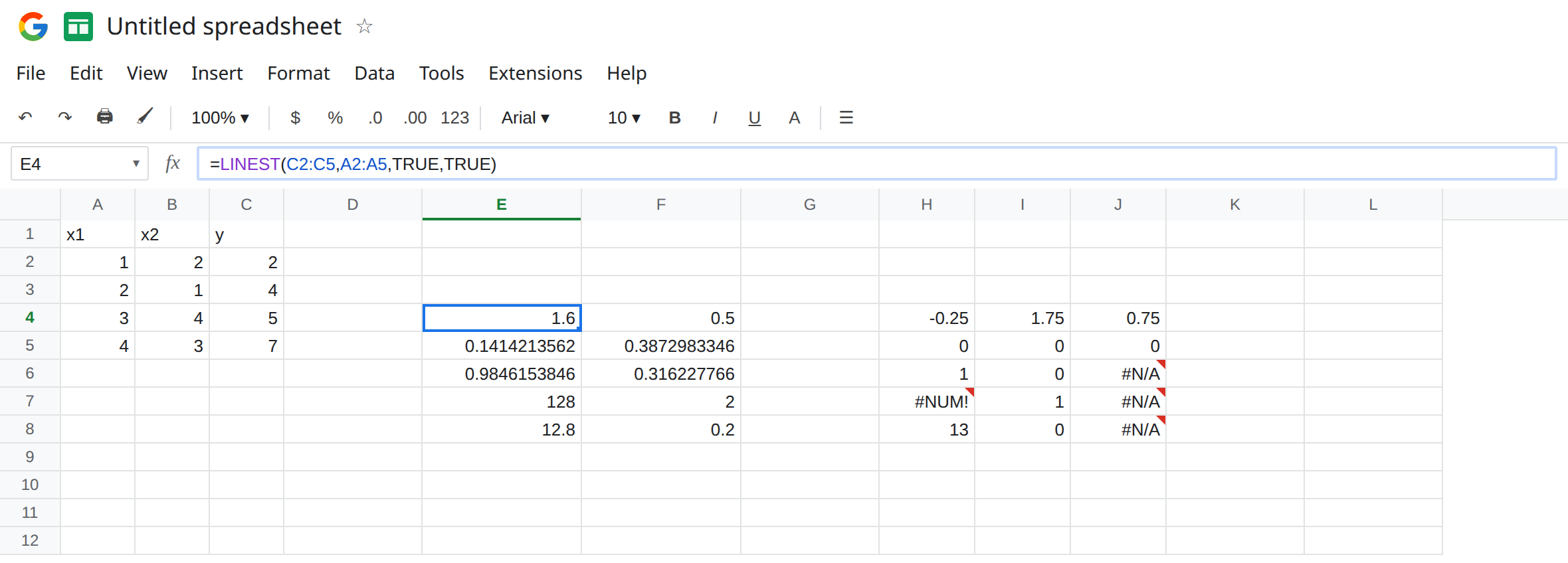
The same fit, verbose. In E4 enter =LINEST(C2:C5,A2:A5,TRUE,TRUE). The spill is five rows and two columns, E4:F8. E4 is still 1.6. F4 is still 0.5. The rows underneath are standard errors, r², F, and the sums of squares. Both columns are filled. A simple one-x fit with an intercept does not need padding. Leave this block up so you can see a verbose result that is entirely numbers.
Two x columns. In H4 enter =LINEST(C2:C5,A2:B5,TRUE,TRUE). Known x is now two columns, so the block is five rows by three columns (two slopes and an intercept). Google Sheets lists the coefficients in reverse order of the x columns: the first result column corresponds to x2 (column B), the next to x1 (column A), then the intercept. Rows 1 and 2 of the block have a number in all three columns (coefficients, then their standard errors). Rows 3, 4, and 5 use only the first two columns. The third column of those rows is #N/A. That #N/A is padding. The r² you want is still in the first column of row 3 of the block. Do not delete the formula because column 3 looks broken.
Intercept forced to 0. In E10 enter =LINEST(C2:C5,A2:A5,FALSE,TRUE). calculate_b FALSE forces the intercept to 0 and only estimates the slope. The intercept’s standard-error cell in that block is #N/A, because there is no intercept error to estimate. The slope cell is a number. This #N/A is the same idea as the padding: a slot in the stats grid with nothing to report. It is not “the y values are bad.”
Lengths that do not match. In H10 enter =LINEST(C2:C5,A2:A4). Four y values, three x values. The cell errors. That failure is the ranges. It is not the #N/A already sitting in the successful two-x block. Leave H10 as the error. See the length rule on FORECAST array length for the same pairing, on FORECAST instead of LINEST.
Block the spill. In J6 type note. J6 sits inside the H4:J8 block. H4 becomes #REF!. The tooltip says the array was not expanded because it would overwrite J6. That #REF! is a neighbor. The padding #N/A in a clear block is not. Leave J6 if you want the #REF! visible, and keep the one-x block in E4 so a successful verbose result stays on the sheet.
Leave the #N/A padding described above. Leave E2 as 1.6.
What is actually wrong
Section titled “What is actually wrong”- Verbose TRUE always asks for five rows. The width is “number of x columns, plus one for the intercept” when
calculate_bis TRUE. Lower statistics (r², F, degrees of freedom, the two sums of squares) occupy two columns. Wider blocks pad the rest with#N/A. ISNAof a padding cell is TRUE, and the slope in row 1 is still a number. Do not wrap the wholeLINESTinIFNA. Read row 1 instead.- Coefficient order is reversed relative to the x range. For
A2:B5, do not label the first output column “x1” without checking the docs. The intercept is the last column of row 1. calculate_bFALSE puts0in the intercept slot and#N/Ain that intercept’s standard error. If you needed an intercept, pass TRUE or omit the argument. The default is TRUE.- Mismatched point counts error before any stats block exists (H10). The padding
#N/Aon a successful two-x fit is not that.
This is not MODE.MULT spilling modes. See MODE.MULT spill. No repeated value there is #N/A for the whole formula. Here the slope is still a number.
Leave H10 as the length error. Delete note in J6 after you have seen the #REF!, so the two-x block can spill again and the padding #N/A comes back.
Read row 1, then the r² cell. In the one-x block, E4 is the slope 1.6 and F4 is the intercept 0.5. r² is E6. In the two-x block, ignore #N/A in column 3 of rows 3–5. Coefficients are row 1, in reverse x-column order. r² is the first cell of row 3.
Match the rows. C2:C5 with A2:A5, not A2:A4.
Do not wrap H4 in IFERROR. You would blank the slope along with the padding. See IFERROR vs IFNA.
If #N/A sits only in the extra columns of the lower stats rows, read row 1. If the formula cell errors and x is shorter than y, lengthen x. If the formula cell is #REF!, move the neighbor.
Padding vs a failed fit
Section titled “Padding vs a failed fit”One x, verbose TRUE: five by two, slope 1.6, intercept 0.5, no padding. Two x: five by three, and column 3 of the bottom three rows is #N/A on purpose. calculate_b FALSE: the intercept’s standard error is #N/A. A short x range errors before a stats block exists. A filled neighbor is #REF!.